# How we reduced Next.js page size by 3.5x and achieved a 98 Lighthouse score
**Published by:** [Paragraph](https://paragraph.com/@blog/)
**Published on:** 2021-12-03
**Categories:** nextjs, react, programmingtips
**URL:** https://paragraph.com/@blog/how-we-reduced-next.js-page-size-by-3.5x-and-achieved-a-98-lighthouse-score
## Content
*Papyrus is a blazing-fast, privacy-first, no-frills-attached blogging & newsletter platform. [Sign up](https://papyrus.dev?utm_source=papyrus&utm_medium=blogpost&utm_campaign=nextjs_blog) and start writing posts just like this one.* *** [Papyrus.dev](https://papyrus.dev) is built on Next.js, which is a production-grade framework for React. It comes with a handful of opinionated and sensible defaults. Plus, it lets you produce static pages - just HTML, CSS and JS - from React code. Static pages in particular are something we use heavily. For pages that rarely change - like blogposts - there’s no reason why 1) servers need to be involved at serving time, or 2) the response size is larger than a few hundred kB. Ideally, we’d hit the API once (at build time, or every time the blog content is updated), insert the API response into the HTML, bundle up the minimal set of JS and CSS required to render the page, and serve the bundle globally on CDNs. Next.js makes it easy to do this. Since we rely on static pages so much, we wanted to ensure we were doing everything in our power to guarantee they were small and fast - so, when Next.js started shaming us for our large static page sizes, we knew we had some optimization work to do: Large page sizes means slower loading, and this is bad: they lead to a poor user experience, high bounce rate, and [negatively affected SEO](https://moz.com/learn/seo/page-speed). *(\~500 kB first load JS is actually pretty small relative to the average JS a website loads in 2021, but we still think it’s unnecessarily large for a simple blog page).* Our performance issues were confirmed by our less-than-ideal Google Lighthouse scores: 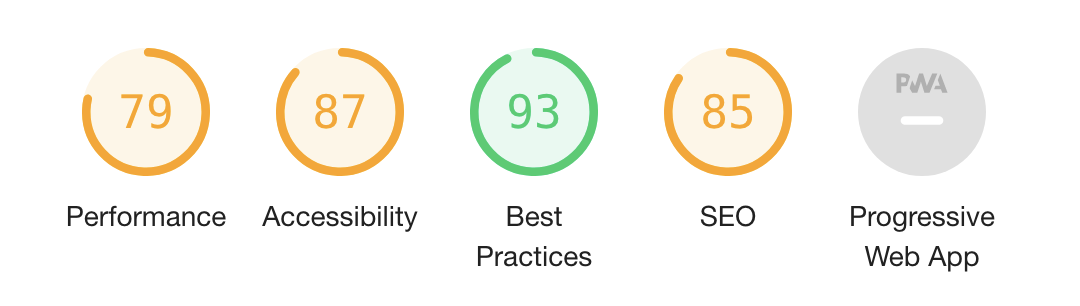The scores in isolation aren’t necessarily a conclusive way to determine a page’s performance, but they can provide some actionable guidance on what could be improved. This blogpost is documenting some of the things we discovered. In the end, we successfully **achieved a 98 Performance Lighthouse score**, and reduced our largest **first-load-JS size by 3.5x**. In addition, we also implemented a handful of best practices along the way, such as image optimization. Let’s dive into it. ## Analyzing Packages A handful of tools are available to provide some clues on where we can focus our size-reduction efforts. `@next/bundle-analyzer` is one such tool - it’s used to analyze the bundle size of your Next.js components, pages, and third party dependencies. Install it into your dev dependencies with `yarn add -D @next/bundle-analyzer`, and add the following to `next.config.js` to run it using the `ANALYZE` environment variable: ```javascript const withBundleAnalyzer = require("@next/bundle-analyzer")({ enabled: process.env.ANALYZE === "true", }) module.exports = withBundleAnalyzer({{{ // This is just your regular next.config.js options. For example: // images: { // domains: ["storage.googleapis.com"], //}, }) ``` To actually begin the analysis, run `ANALYZE=true next build`, or, alternatively, add it to your `package.json` as a new script to keep it handy and accessible via `yarn analyze`: ```javascript // package.json { // ... "scripts": { "analyze": "ANALYZE=true next build", }, // ... } ``` When you run it, you’ll see the normal Next.js build process, but your browser will open with a very colorful page like this: There’s a lot of info here, but one thing that sticks out is that `highlight.js` (in particular the languages contained within) is massive. We use `react-syntax-highlighter` to highlight syntax in our blogposts, and it depends on `highlight.js`. So, what can we do to improve this? Luckily, `react-syntax-highlighter` makes it easy to defer loading the languages until we need it. This is called dynamic importing. ## Dynamic Imports Dynamic imports are an [ES2020 feature](https://github.com/tc39/proposal-dynamic-import) (also [supported by default in Next.js](https://nextjs.org/docs/advanced-features/dynamic-import)) that enables dynamically loading JS at runtime, possibly based on some conditional logic. For example - we can load a search library only after a user clicks on a searchbox. You can imagine how this can be used broadly to reduce the page first-load size: defer libraries until after the page loads (or, ideally, until they are needed). `react-syntax-highlighter` makes this even easier, as [they provide](https://github.com/react-syntax-highlighter/react-syntax-highlighter#async-build) an out-of-the-box import statement which defers loading the languages. After switching our syntax highlighter to the dynamic-imported package, let’s see how that affected our page size: 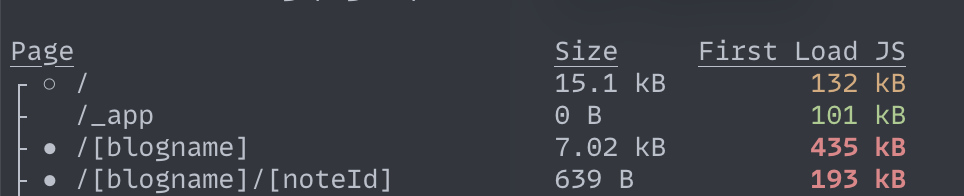Pretty significantly! This reduced the blogpost dynamic route (/\[blogname\]/\[noteId\]) first-load JS size by **nearly 2.5x**. (The blog homepage didn’t change though, but we’ll fix that next). And, when running `yarn analyze` again we can see the languages are no longer present: 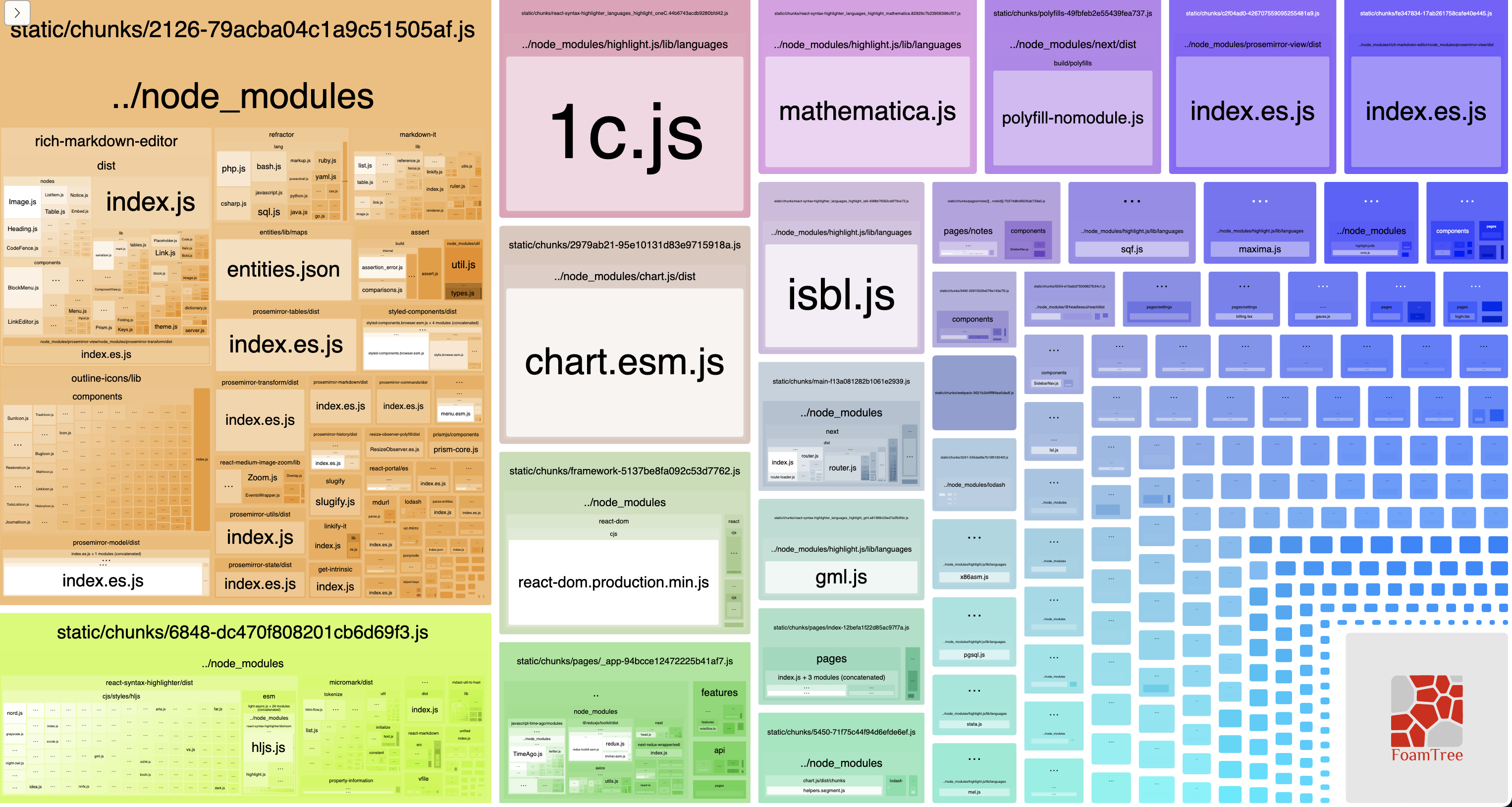Good progress so far, but let’s keep pushing onward. ## Remove Unused Code Unused exports are removed at build-time, but if you’re *actually* using a package in a codepath that *does nothing*, the package will still be bundled but it will still be …doing nothing! Let me explain via an example: during a major refactor of our codebase, we created an environment variable boolean that controlled if a new version of the blog page was to be displayed. If it was set to a false we displayed an older component, but if we flipped it to true we displayed a newer one. Our code looked something like this: ```javascript import NoteView from "components/public/NoteView" import NewNoteView from "components/public/NewNoteView" // ... return (
{ ENV_DEPLOY_NEW == true ? : }
) ``` We gradually ramped this up, and after it was fully set to `true` for all users, we promptly …forgot about this flag. This meant that `NoteView` was imported, and **never actually used**. Let’s remove it and see how this influences the page size: Again, this significantly reduced the pagesize (of the blog dynamic route, /\[blogname\]) and resulted in a 3.5x decrease in size! ## Purge Unused CSS One thing that stuck out in the Next build analysis was the massive CSS file shared by all pages: 354kb of CSS?! We use Tailwind for Papyrus, and by default it comes with **lots** of utility classes. If you don’t strip these from your production build, you’ll have a large CSS file with a good portion of classes not used. Let’s follow the [Tailwind guide on optimizing for production](https://tailwindcss.com/docs/optimizing-for-production), and add a `purge` entry to our `tailwind.config.js` file: ```javascript module.exports = { purge: [ "./pages/**/*.tsx", "./pages/**/*.js", "./pages/**/*.ts", "./components/**/*.tsx", "./components/**/*.js", "./components/**/*.ts", ], // ... } ``` Re-running `yarn build` shows another large improvement (in the CSS size - the other metrics, including first load JS, naturally didn’t change):  ## Disable Prefetching Google Lighthouse complained of an unused javascript from a JS file called `index-c78019c9dfd0b22f4016.js`. It turns out this is a **prefetched version** of the Papyrus homepage (the `index` page). When using the Next-provided `Link` component, Next automatically prefetches all pages in the viewport (or, when the user hovers over the link). This enables ultra-fast navigation, but it’s also viewed as unnecessary JS by Lighthouse. We use the Link component to link to our homepage via our logo, which is displayed on every blogpost page. Depending on the likelihood blog visitors will click the link it could make sense to kept his prefetched, but for the sake of optimization let’s disable it. We can do this by using the `prefetch` prop: ```javascript ``` This didn’t impact our first-load pagesize (providing by `yarn build`), but it did bump up our lighthouse scores pretty significantly as will be seen below. ## Optimize Images Next has [built-in image optimization](https://nextjs.org/docs/basic-features/image-optimization) via the `next/image` library and `` component. This allows for resizing, compressing, and serving images in optimized formats (such as WebP, when the browser supports it). This also enables lazy-loading - only images that are requested are optimized on-demand then served. We had a custom Logo component that looked something like this: ```javascript export default function Logo(props: Props) { return ( ) } ``` We can refactor this to begin using image optimization: ```javascript import LogoImg from "public/logo.jpg" import Image from "next/image" export default function Logo(props: Props) { return ( ) } ``` We did a few different things in the above code: * **Imported the image statically** (from `public/logo.jpg`). This needs to be a static import in order to use blurring. * **Blurred the image upon loading**, via the `placeholder=”blur”` prop. When the image is displayed, a low-resolution image is first displayed and blurred until the full-resolution one has loaded, so you get a neat fade-in effect. If you import the image directly, as above, this happens automatically; otherwise, you need to provide the [blurDataUrl field](https://nextjs.org/docs/api-reference/next/image#blurdataurl). * **Preloaded the image**, via the `priority` prop. This instructs next to pre-load images that we consider high priority. The logo is displayed above-the-fold on pretty much every page, so it makes sense to pre-load. Unfortunately, this didn’t actually affect any of our metrics - neither the Lighthouse score or Next build size budged - but this may be because the logo we have is already appropriately sized and small (\~5kb). If we did this on much higher-resolution images, this may move the needle more drastically. This did get us a neat blur-in effect, though! Let’s see what all of these tweaks got us. ## Results & Final Thoughts The results, after applying all the above fixes:  Success! We went from a **79 to a 98 Lighthouse Performance score**, and reduced our largest JS first-load size by **3.5x (468kB to 181kB)**. This list of optimizations is not exhaustive, and we can likely do better than 181kB - NextJS is still shaming us with red - but for an afternoon spent on fixing these low-hanging fruit, we achieved a pretty decent reduction in page size.
## Publication Information
- [Paragraph](https://paragraph.com/@blog/): Publication homepage
- [All Posts](https://paragraph.com/@blog/): More posts from this publication
- [RSS Feed](https://api.paragraph.com/blogs/rss/@blog): Subscribe to updates
- [Twitter](https://twitter.com/paragraph_xyz): Follow on Twitter
## Optional
- [Collect as NFT](https://paragraph.com/@blog/how-we-reduced-next.js-page-size-by-3.5x-and-achieved-a-98-lighthouse-score): Support the author by collecting this post
- [View Collectors](https://paragraph.com/@blog/how-we-reduced-next.js-page-size-by-3.5x-and-achieved-a-98-lighthouse-score/collectors): See who has collected this post
 ) } ``` We can refactor this to begin using image optimization: ```javascript import LogoImg from "public/logo.jpg" import Image from "next/image" export default function Logo(props: Props) { return (