# Are you tired of Google Chrome slowing down your computer? You might find this helpful.
*Here are 7 simple ways to speed up your Chrome Browser.*
By [The BlogChain Newsletter](https://paragraph.com/@kazani) · 2022-12-15
google, browser
---
The world’s most popular browser is Google Chrome.
Unfortunately it sucks your computer memory and slows it to a crawl.
**Here are 7 simple ways to speed up your Chrome Browser**
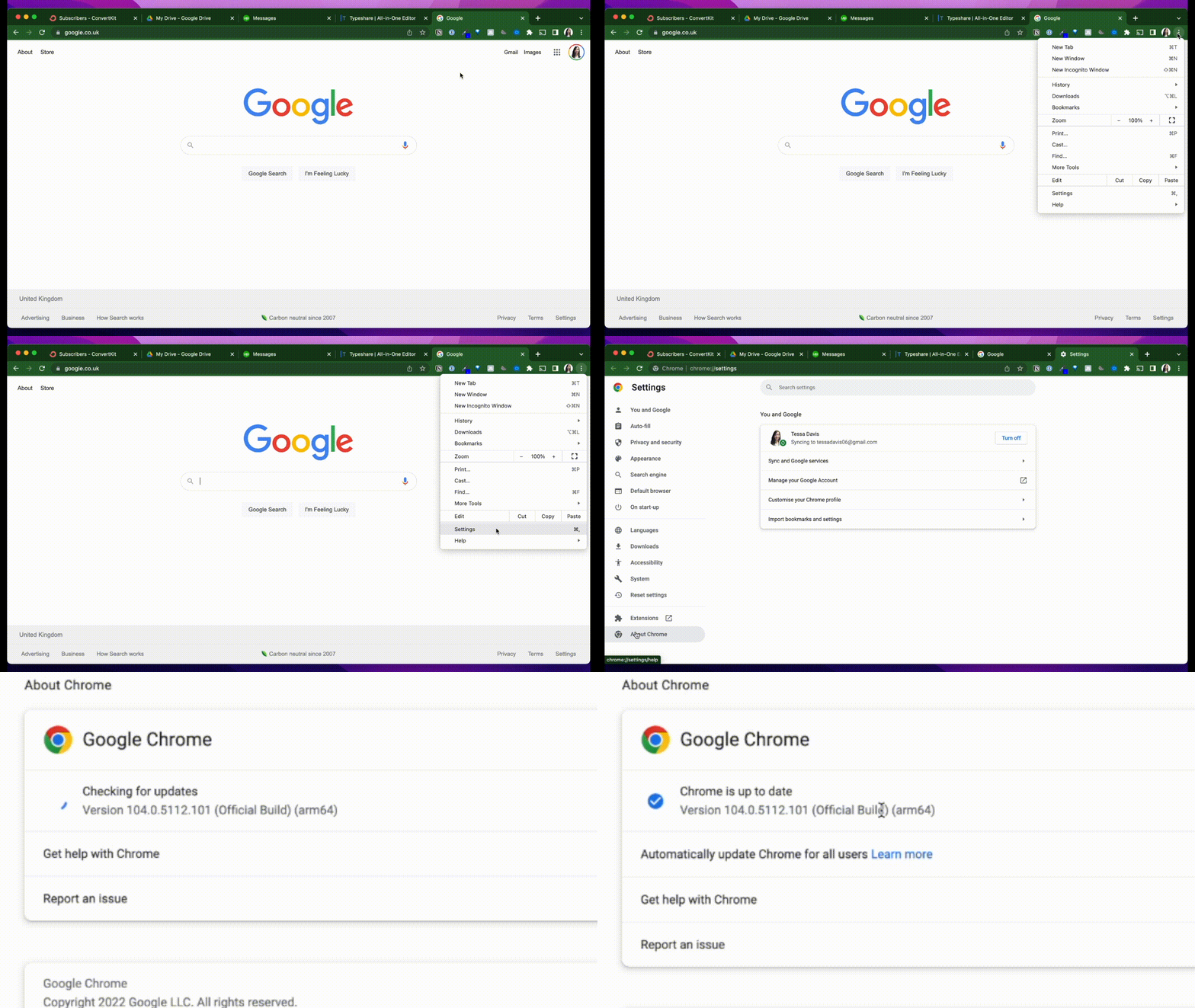
Before we start, ensure you’re using the latest version of Chrome.
* Click the 3 dots (Options)
* Choose ‘help’
* Click ‘about Google Chrome’
It’ll tell you if yours is up-to-date.
If it’s not, update it now.
* * *
BROUGHT TO YOU BY
-----------------
[NEEVA](https://neeva.com/p/signup?o=s&c=CDu_MPaTNcEo98S0dbLVPuYdc45)
=====================================================================
To re-imagine search. By rejecting the ad-support model, **Neeva** is building a search experience that puts the user first, does not compromise on quality or privacy, and is leading a new frontier by leveraging in house large language models (LLMs) and refined training models with its full system search stack to bring authentic real time AI search to the masses.
Information reliability, accuracy and authenticity is going to be a problem to solve in the age of **AI**. The easier content is to produce, the harder it is to know if something is right or wrong. _I’m going to follow Neeva because their mission is bold and exciting._ One of our most valuable traits as human being is knowing how to adapt and making decisions with the right amount of information. AI is an incredible piece of technology if we use it to gather information and make a decision. AI is dangerous piece of technology if we delegate all of our thinking to it.
[CREATE YOUR FREE ACCOUNT TODAY](https://neeva.com/p/signup?o=s&c=CDu_MPaTNcEo98S0dbLVPuYdc45)
----------------------------------------------------------------------------------------------
* * *
1: Clear your browsing data.
============================
As you visit more + more websites, data accumulates in Chrome.
This slows your browser down.
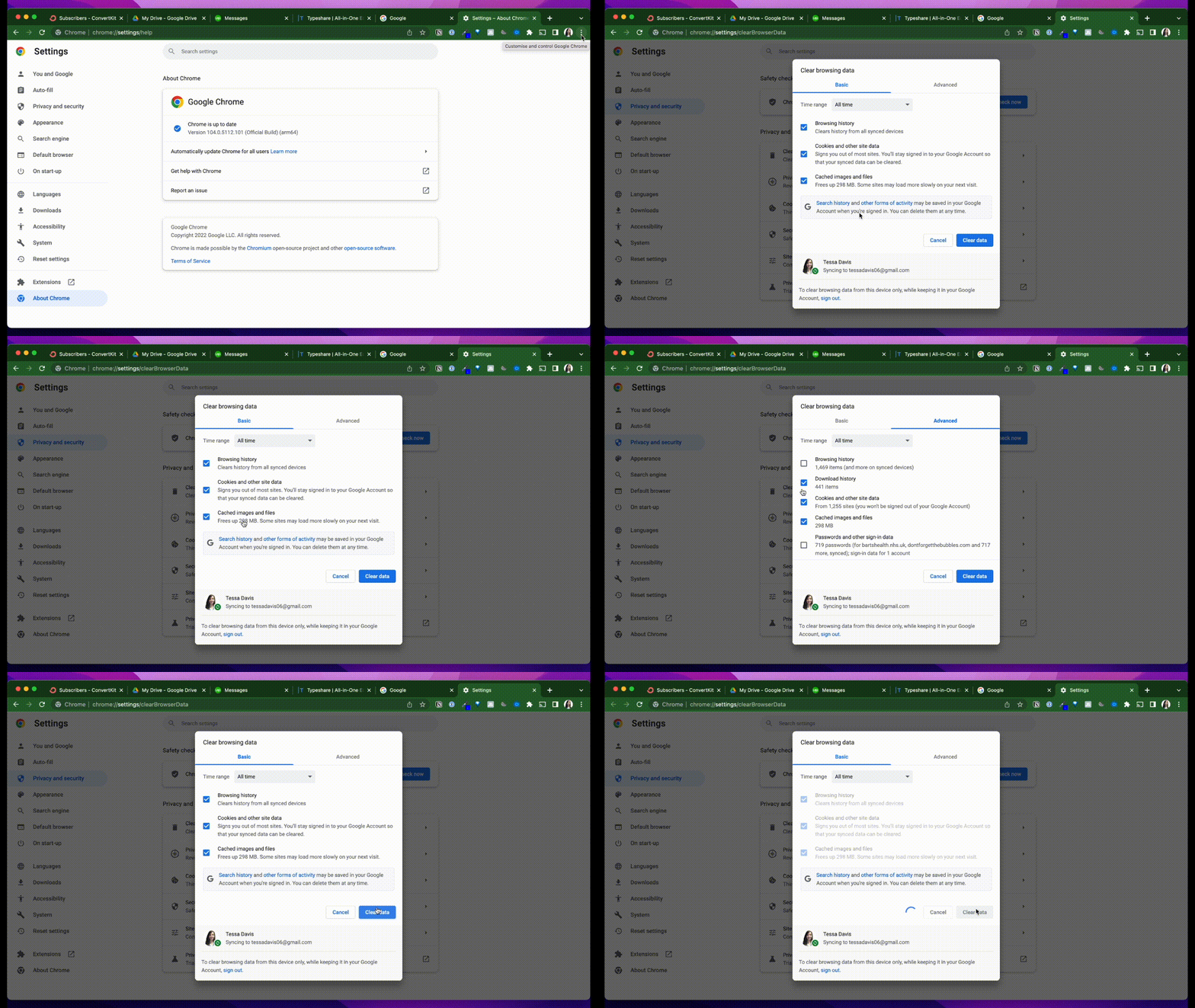
Have a clear out:
* Choose the ‘Chrome’ tab
* Click ‘clear browsing data’
* Choose ‘All time’
Now you can select which elements you want to clear.
Then clear your data.
* * *
2: Set up auto-delete.
======================
Clearing data ONCE isn’t enough - do it regularly to ensure it doesn't accumulate again.
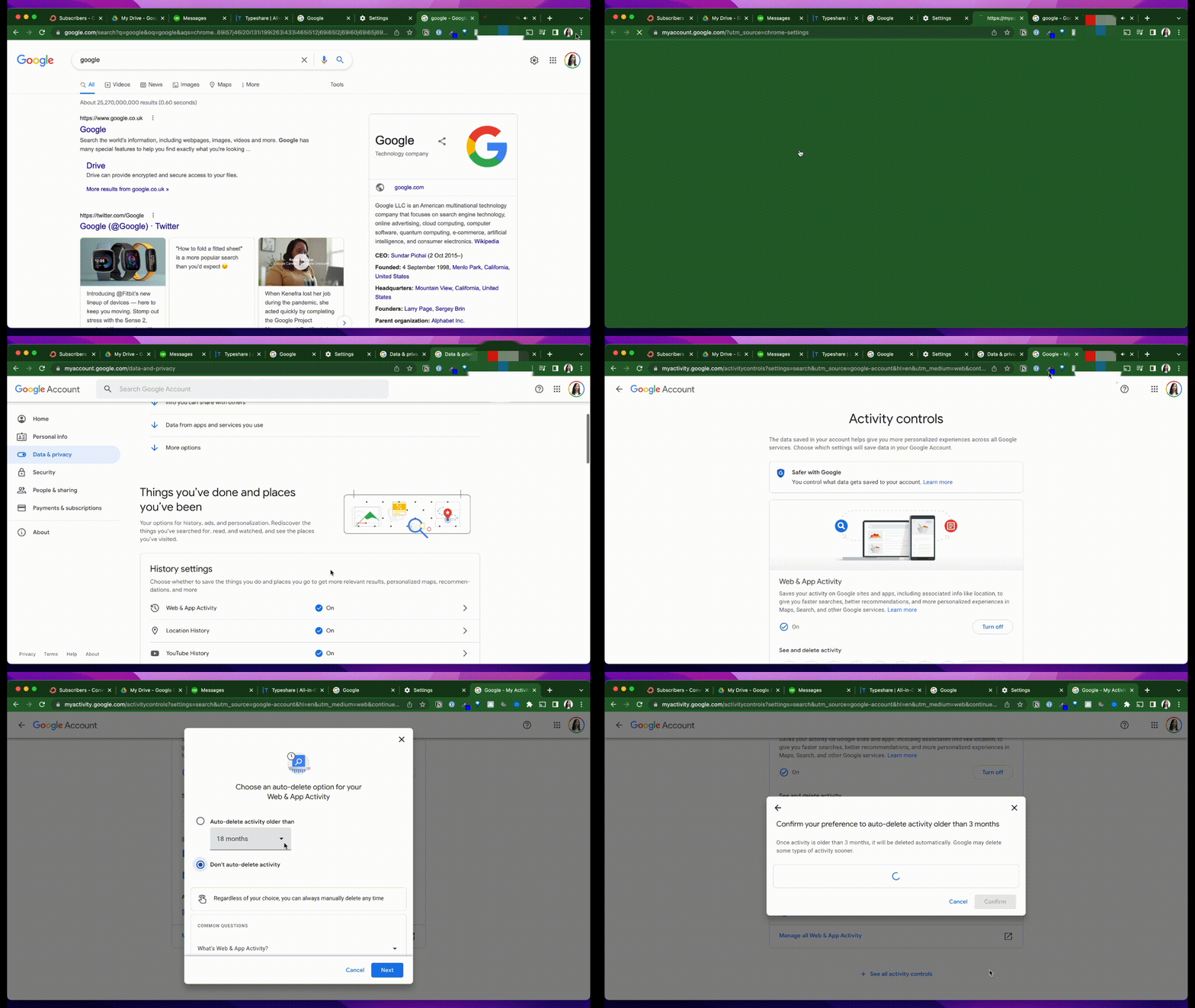
Click:
* Options
* Settings
* Manage Google account
* Manage data + personalization
* Manage data + privacy
* Web + app activity
Turn auto-delete on + delete your old activity automatically.
* * *
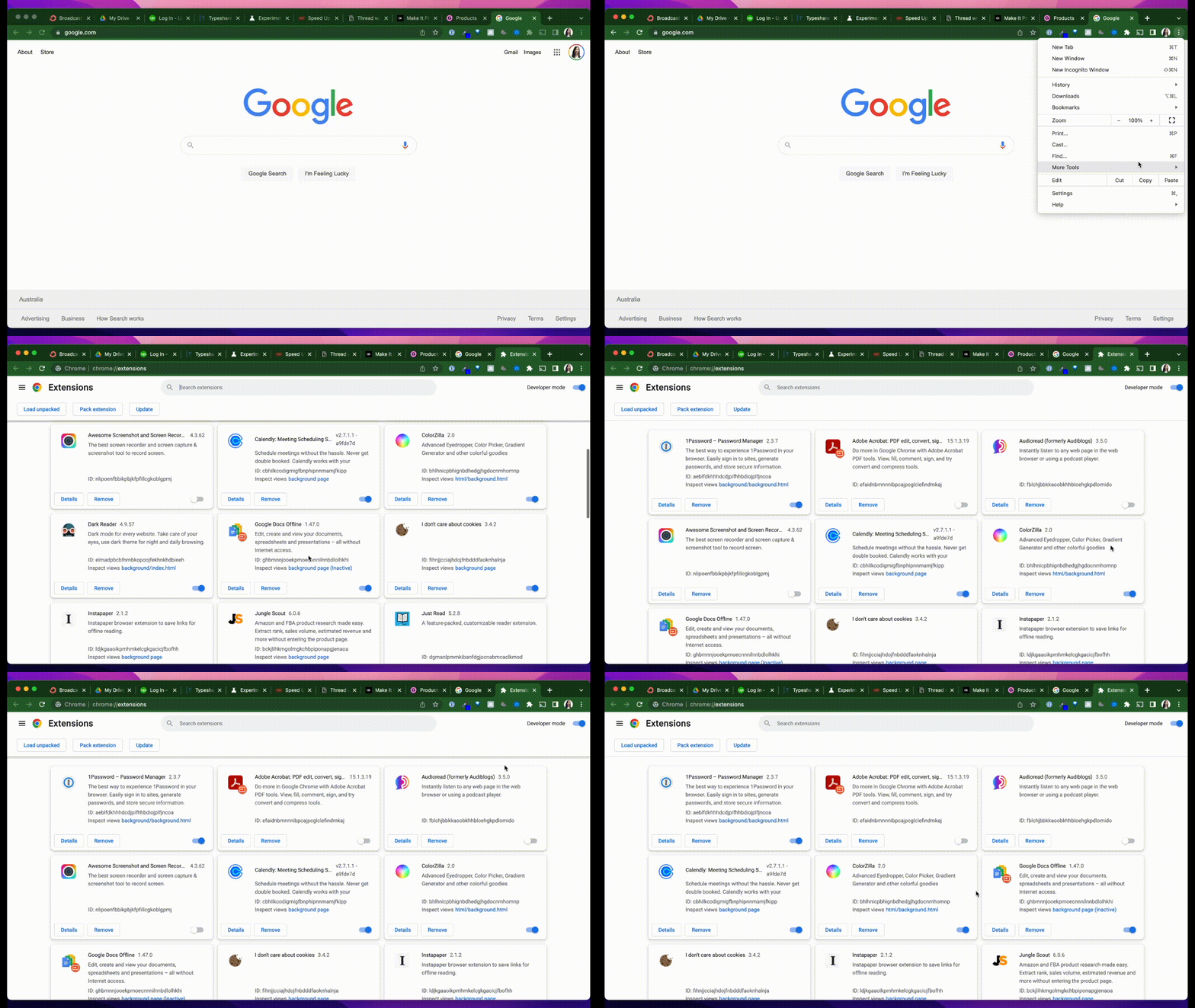
3: Disable extensions you aren’t using.
=======================================
Extensions are wonderful, but they slow down your computer.
Remove the extensions you don’t actually need:
* Go to 'Options'
* Click 'More tools'
* Choose 'Extensions'
Then disable and remove the ones you no longer use.
* * *
4: Remove web apps.
===================
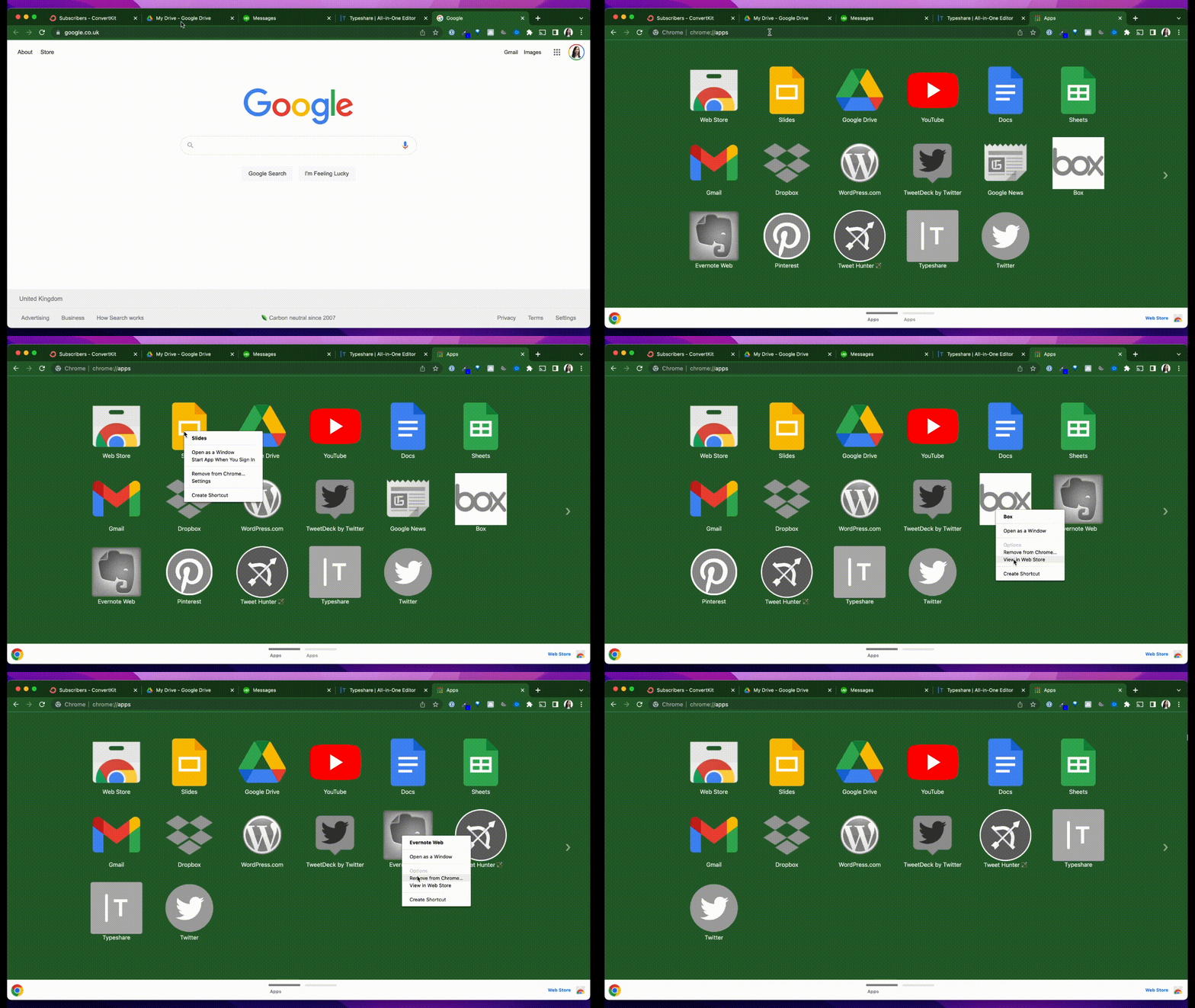
Chrome apps suck memory so if you don’t need them, remove them.
Go to chrome://apps to see which you have installed:
* Right click on any you don’t use
* Remove them
It’s time for a clear out.
* * *
5: Make webpages open faster with prefetch.
===========================================
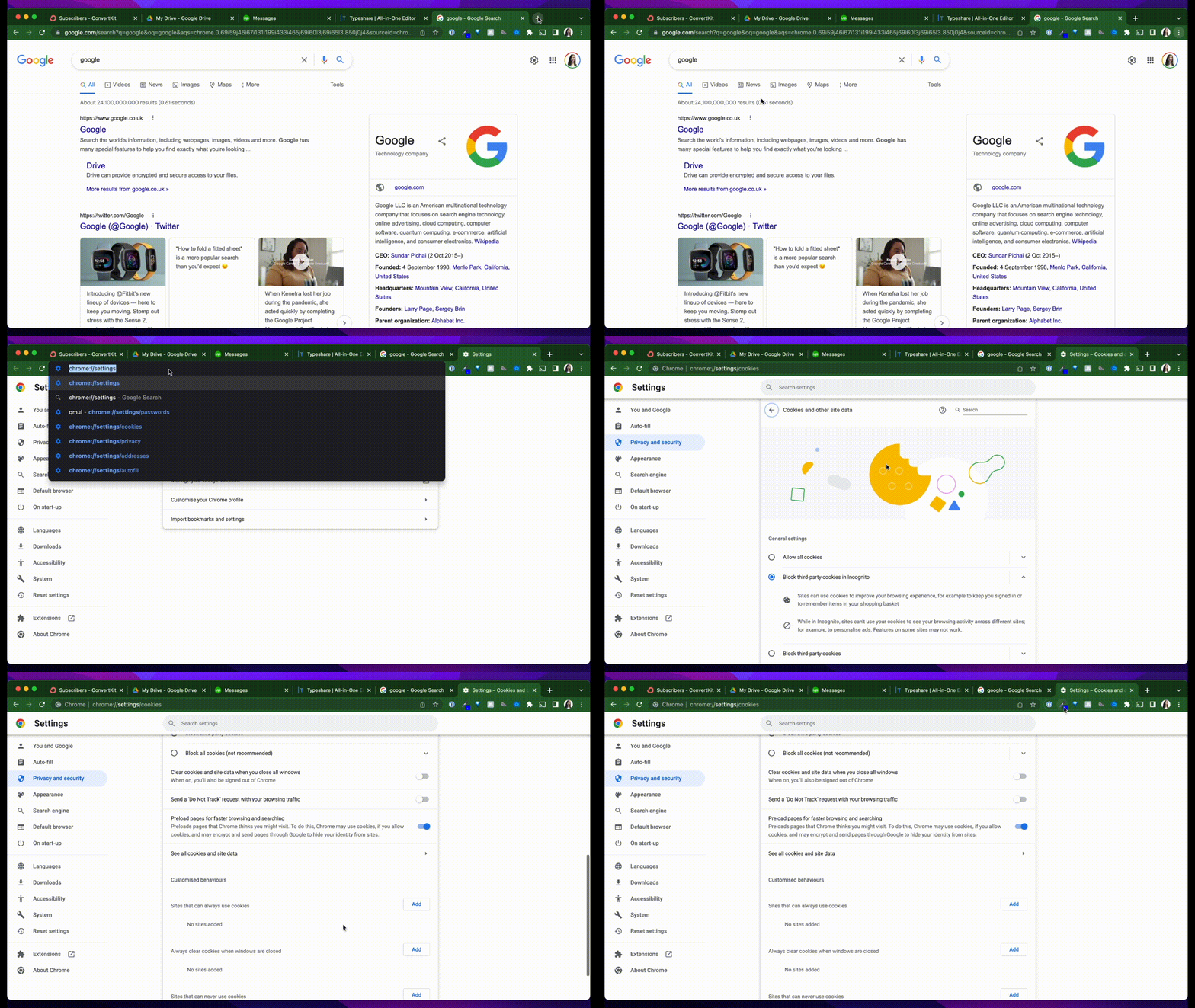
Prefetch anticipates where you might go next.
Turn prefetch on with the following steps:
* Go to chrome://settings/cookies
* Turn on ‘preload pages for faster browsing’
It loads your next page in the background for faster access.
* * *
6: Suspend your tabs.
=====================
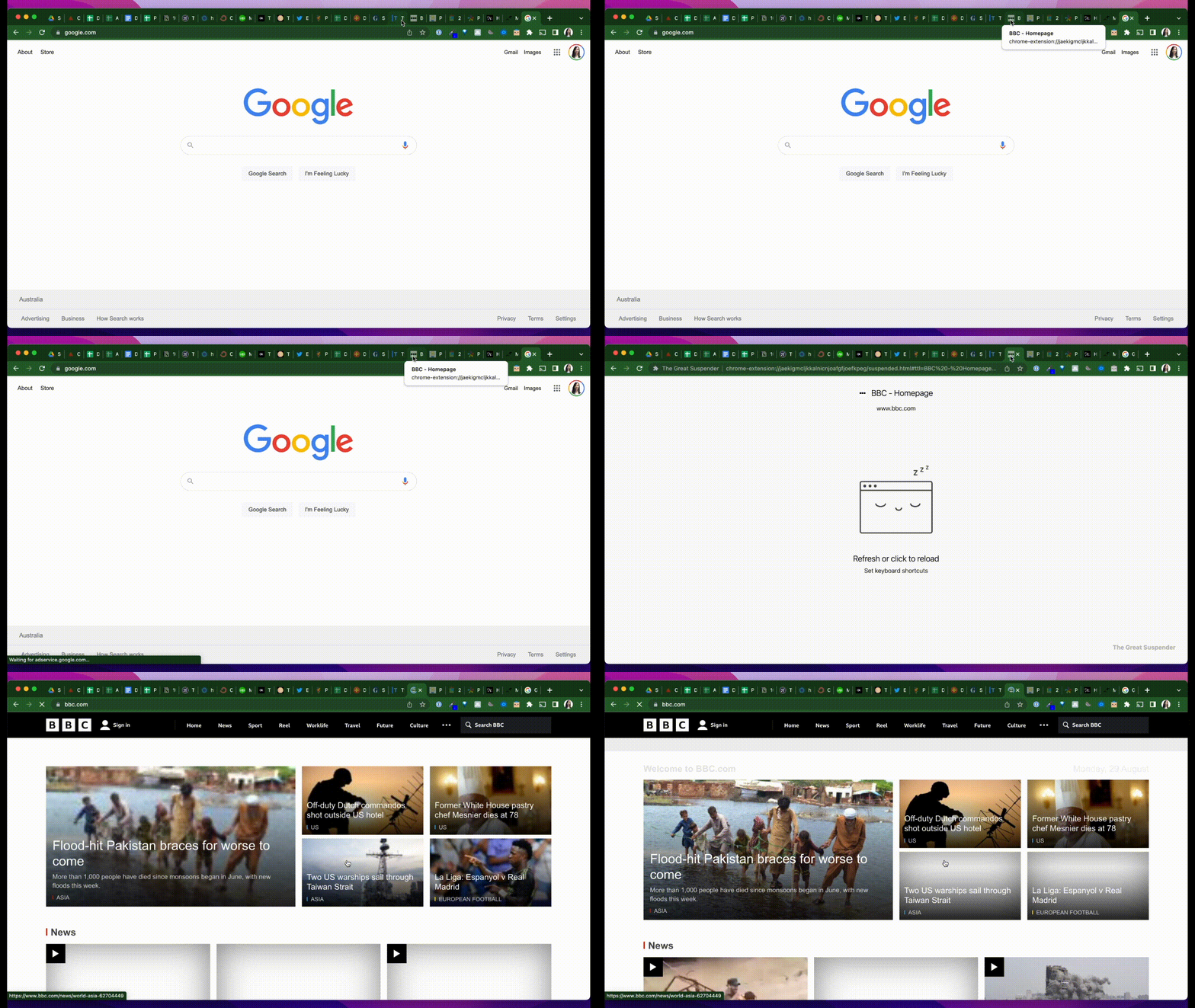
I often have a gazillion tabs open at once which slows my browser.
The Great Suspender app solves this:
* It suspends tabs I’ve not used for a while.
* But keeps them open for when I need them
This saves on memory while tabs are dormant.
### DOWNLOAD EXTENSION [_HERE_](https://chrome.google.com/webstore/detail/the-great-suspender/jaekigmcljkkalnicnjoafgfjoefkpeg?hl=en).
* * *
7: Use experimental features
============================
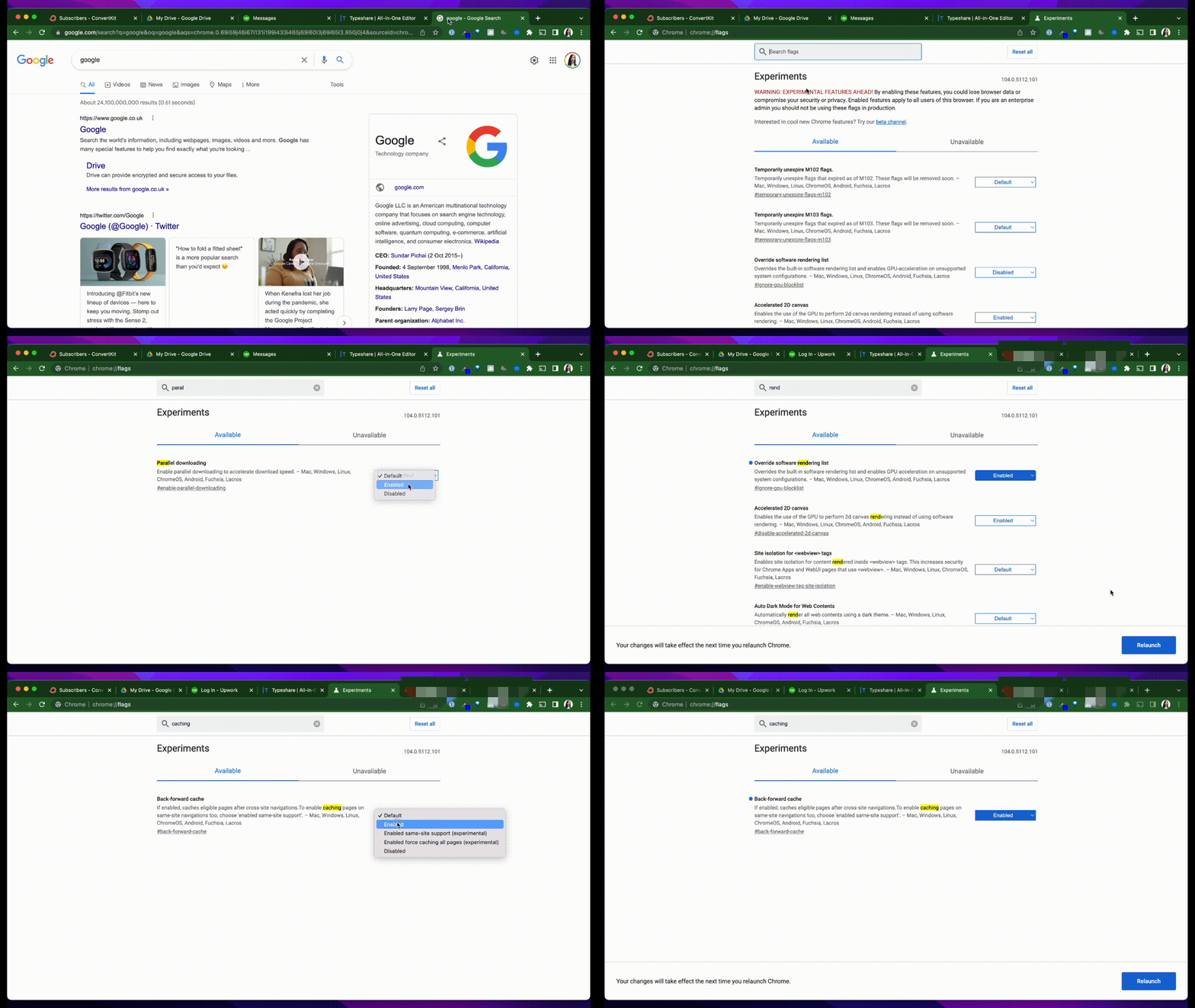
Go to chrome://flags to use these.
Here, you can try features that haven’t been fully released.
Consider these 3 flags:
* ‘Parallel downloading’ improves download speed
* ‘Back-forward cache’ stores sites for quick use
* ‘Override software rendering list’ uses GPU acceleration
Give them a go.
* * *
credit: [Tessa Davis](https://tessardavis.com/)
* * *
EXTRA TIP
================
Do you use **Incognito Mode?**
I am sure you do but do you know the history is actually.... **saved?**
And yeah, someone can actually go through that
So, how do you delete that?
### Copy this
chrome://net-internals/#dns
### Now - `clear host cache`
I bet you loved this one 😬, am I right ?
* * *
_"Don't miss out on my Newsletter and Claim your FREE Membership Today!"_
-------------------------------------------------------------------------
[CLAIM NOW!](https://app.unlock-protocol.com/checkout?paywallConfig=%7B%22locks%22%3A%7B%220x80c558c2468efbfb0a2a5cc9bfe4d4588a41eebb%22%3A%7B%22network%22%3A137%2C%22name%22%3A%22%22%2C%22captcha%22%3Afalse%2C%22password%22%3Afalse%2C%22emailRequired%22%3Atrue%2C%22maxRecipients%22%3A%22%22%2C%22dataBuilder%22%3A%22%22%2C%22skipRecipient%22%3Afalse%7D%7D%2C%22pessimistic%22%3Atrue%2C%22skipRecipient%22%3Atrue%2C%22title%22%3A%22BlogChain+by+Adil+Kazani%22%2C%22icon%22%3A%22https%3A%2F%2Fgaia.blockstack.org%2Fhub%2F1Ju9S4ZddzfWPa2QqCM1gCKddXXbbWFpcz%2F1825e501e353ddb9b5f58625cc5bb30c3f954477df6a725747ecd418bc74901c.png%22%2C%22redirectUri%22%3A%22https%3A%2F%2Fparagraph.xyz%2F%40kazani%2Fsubscribe%22%2C%22persistentCheckout%22%3Afalse%2C%22referrer%22%3A%220x45e43896d1FBA7CecbF034d82D790BB71cB5e589%22%2C%22messageToSign%22%3A%22%22%2C%22hideSoldOut%22%3Afalse%7D)
===========================================================================================================================================================================================================================================================================================================================================================================================================================================================================================================================================================================================================================================================================================================================================================================================================================================================================================================
* * *
**How well do you know ₿itcoin?**
==================================
**Take this** [**Bitcoin**](https://www.adilkazani.com/2022/03/what-is-bitcoin.html) **Trivia Quiz and get a chance to win a BlockSurvey NFT worth $100!**
====================================================================================================================================================================
[GET STARTED!](https://blocksurvey.io/survey/18yrrxQdfY1uYDTuyNGcbWMR3edR6hw4zU/67018ee3-42e3-4a52-9bf9-29f51214c68a)
=====================================================================================================================
* * *
**I hope this was helpful!**
**Thank you for reading!**
**If you're interested in following along, feel free to** [**_subscribe_**](https://paragraph.xyz/@kazani/subscribe)**_!_**
**Let’s bust some more in next article.**
**GET UP TO 100 USDT on _BINANCE_ -** [**Register NOW**](https://www.binance.com/en-IN/activity/referral-entry/CPA?fromActivityPage=true&ref=CPA_006R0AZVVC)**!**
------------------------------------------------------------------------------------------------------------------------------------------------------------------------
[REDEEM GIFT](https://www.binance.com/en-IN/activity/referral-entry/CPA?fromActivityPage=true&ref=CPA_006R0AZVVC)
=================================================================================================================
My Latest Blogs:
================
[**5 AI Art Generators You Can't Miss**](https://www.adilkazani.com/2022/12/5-ai-art-generators-you-cant-miss.html)
[**All You Need To Know About Wrapped Ethereum (wETH) And How To Get It On MetaMask**](https://www.adilkazani.com/2022/11/what-is-weth-wrapped-ethereum.html)
[**What is a Merkle Tree?**](https://www.adilkazani.com/2022/11/what-is-merkle-tree.html)
[**How to Create Your Own Cryptocurrency?**](https://www.adilkazani.com/2022/11/how-to-create-your-own-cryptocurrency.html)
**If you want more, be sure to**
[**FOLLOW ME**](https://owl.link/kazani.btc)
===============================================
---
*Originally published on [The BlogChain Newsletter](https://paragraph.com/@kazani/are-you-tired-of-google-chrome-slowing-down-your-computer-you-might-find-this-helpful)*