# What Is NextDNS And Why You Should Set Up & Configure On Your Phone Right Now!
*Say Goodbye to Privacy Concerns and Embrace NextDNS for Unparalleled Online Security*
By [The BlogChain Newsletter](https://paragraph.com/@kazani) · 2023-07-11
nextdns, online, security, privacy, dns
---
**Good Morning!**
**Delivering interesting content every single week on Web3, Security, Crypto, NFTs, Design & AI.**
**It's FREE, Takes less than _5-minutes to read_, and you are guaranteed to learn something.**
**Subscribe to get valuable News, Useful Resources and Insights every week to your Inbox!**
[Subscribe](https://paragraph.xyz/@kazani/subscribe)
* * *
**An Introduction to NextDNS: A Comprehensive Privacy and Security Tool**
Welcome to this guide, where we will explore **NextDNS**, a powerful privacy and security tool that empowers you to regain control over your devices through DNS. In this tutorial, we will discuss what NextDNS is and highlight its distinguishing features compared to other DNS providers. We will delve into the **available settings, suggest practical use-cases, provide blocklist recommendations**, and guide you through the setup process. By the end, you will feel confident in utilizing NextDNS to safeguard your online experience.
_In today's interconnected world, maintaining online security and privacy has become increasingly crucial. With threats looming around every corner of the internet, it's vital to have robust protection in place. NextDNS, an innovative DNS-based content filtering and security solution, is here to save the day. By redirecting your DNS queries, NextDNS empowers you to take control of your online activities, ensuring unmatched security and privacy._
### **Advantages:**
* Experience unprecedented control and safeguard your privacy with NextDNS.
* Ensure comprehensive security across your devices through the power of DNS.
* Enjoy an intuitive user interface and robust functionalities for effortless management.
* Benefit from advanced filtering options and extensive customization capabilities.
[**The Domain Name System (DNS)**](https://en.wikipedia.org/wiki/Domain_Name_System) is widely used for connecting to websites. While most users stick to default servers, some opt for publicly accessible ones. However, the options for public DNS providers are limited. **One trustworthy and free option is NextDNS**, which offers a range of features and ensures network security. This article will explore NextDNS's features, guide you through creating a custom DNS using the service, and explain why it's worth a try.
### **Understanding DNS and NextDNS**

DNS, in simple terms, connects **human-readable domain names** (e.g., [adilkazani.com](https://www.adilkazani.com)) to the unique numerical labels of the servers where websites are stored. NextDNS is a firewall-come-DNS service provider that enhances your overall internet experience. It not only allows you to control and monitor your online activity but also ensures its security.
### **Key Features of NextDNS**
**NextDNS offers several features that make it an attractive option:**
1. **Enhanced Security**: NextDNS safeguards your network from cyber threats, providing a secure browsing environment for you and your family. It instantly blocks malicious and unsafe websites, protecting against online dangers.
2. **Ad and Tracker Blocking**: With NextDNS, you can block trackers on websites and even apps, enhancing your privacy and reducing unwanted advertisements.
3. **Malware and Phishing Protection**: NextDNS employs real-time analysis and machine learning algorithms to identify and block websites known for distributing malware and engaging in phishing activities. It keeps you safe from malicious links and prevents unauthorized access to your sensitive information.
4. **Secure DNS Encryption**: NextDNS supports **DNS over HTTPS (DoH)** and **DNS over TLS (DoT)**, offering encrypted connections between your devices and the DNS resolver. This encryption safeguards your DNS queries, ensuring they cannot be intercepted or tampered with by malicious actors.
5. **Parental Controls**: NextDNS provides robust parental control features, allowing you to protect your children from inappropriate content online. With customizable filters and whitelisting options, you can ensure a safe and secure digital environment for your family.
* * *
**In addition to its robust security features, NextDNS prioritizes your privacy. Here's how it keeps your personal information safe:**
1. **No Logging Policy**: NextDNS maintains a strict no-logging policy, meaning it does not store any identifiable information about your browsing habits or IP address. This commitment to privacy ensures that your online activities remain confidential.
2. **Local Network Protection**: NextDNS allows you to protect your entire network, including IoT devices, from potential threats. It acts as a shield against malicious websites and prevents unauthorized access to your smart devices.
3. **Customizable Privacy Filters**: NextDNS offers an extensive range of privacy filters, empowering you to customize your online experience according to your preferences. From blocking social media trackers to preventing data collection by advertising networks, NextDNS gives you full control over your digital footprint.
**Setting Up a Private DNS with NextDNS To get started with NextDNS, follow these steps:**
------------------------------------------------------------------------------------------
1. **Sign Up**: Sign up for the service for free and enjoy configuration on an unlimited number of devices. However, note that there is a monthly query limit.
[
https://nextdns.io
NextDNS
-------
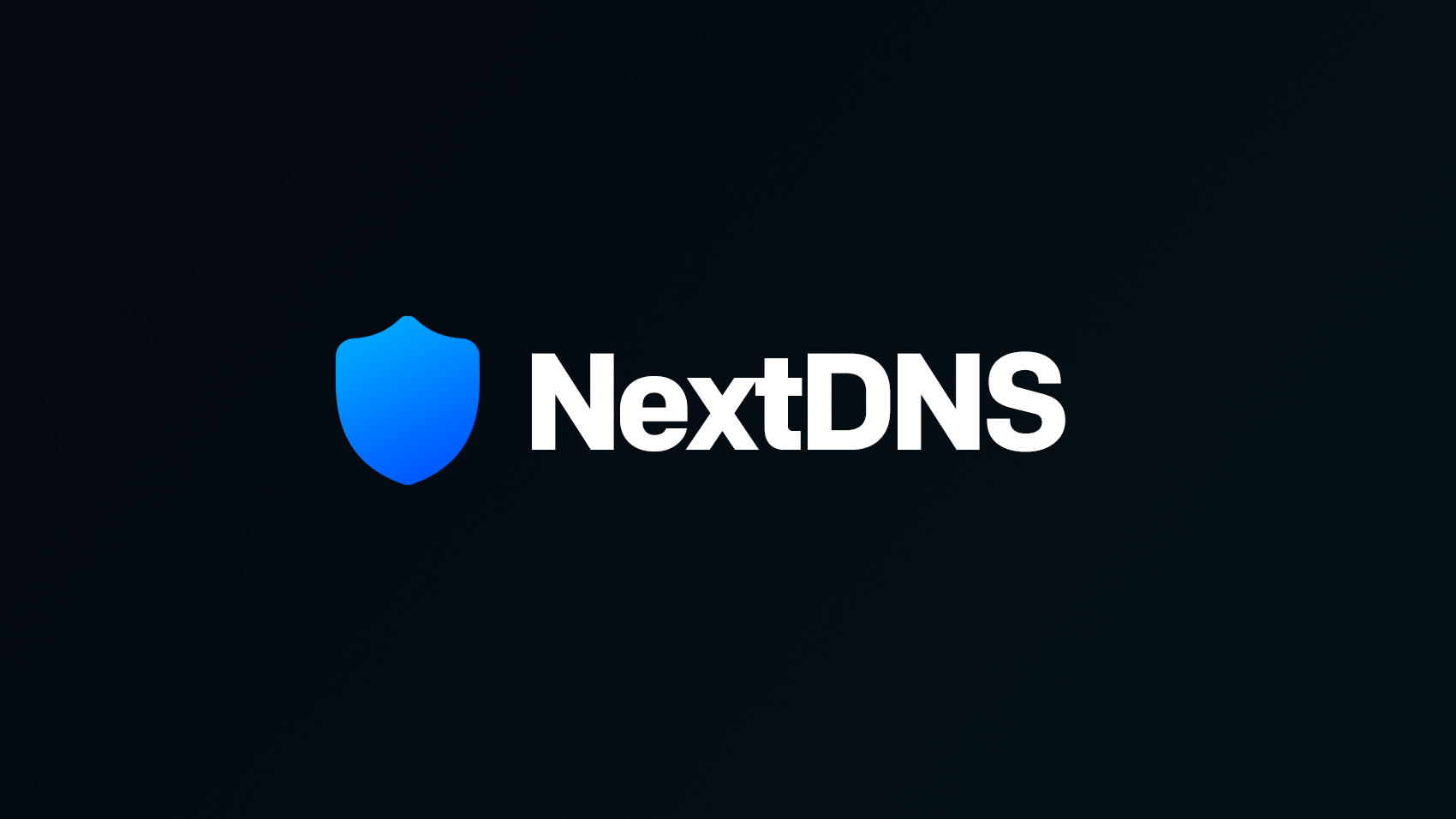
NextDNS protects you from all kinds of security threats, blocks ads and trackers on websites and in apps and provides a safe and supervised Internet for kids - on all devices and on all networks.
](https://nextdns.io/?from=2wpdbg37)
2. **Free Plan**: NextDNS currently offers a **free plan with a monthly limit of 300K queries**. Once this limit is reached, the service operates as a regular DNS resolver with no filtering or logging.
3. **Subscription Plans**: If you have multiple devices to connect, consider NextDNS's subscription plans. They start at just **$1.99 per month**, providing you with higher query limits and additional features.
**Frequently Asked Questions**
------------------------------
1. **Is NextDNS a free service?**
Yes, NextDNS offers a free tier with limited usage and features. However, for enhanced customization and additional benefits, they also provide affordable subscription plans.
2. **Can I use NextDNS with my existing antivirus software?**
Absolutely! NextDNS complements your antivirus software by providing an extra layer of protection against online threats. It works seamlessly alongside any security solution you already have in place.
3. **Will NextDNS slow down my internet connection?**
No, NextDNS is designed to optimize performance. Its global network of servers ensures minimal latency, providing a fast and efficient browsing experience.
[SIGN UP HERE!](https://nextdns.io/?from=2wpdbg37)
==================================================
* * *

**NextDNS uses advanced algorithms and constantly updated threat intelligence to detect and block harmful websites, preventing them from loading on your devices. With its seamless integration, NextDNS offers protection across all your devices, ensuring a consistent shield against online threats.**
* * *
**How to Set Up a Private DNS in NextDNS?**
===========================================
You can sign up for the service for free and configure it on an infinite number of devices, but there is a monthly cap.
At the moment, it offers users **300K queries every month for free**. Once this limit is reached, it reverts to being a normal DNS resolver, with no filtering and logging.
While this should do for a few devices, if you have many smartphones or PCs to connect, you may want to consider the subscription plans, which begin at just $1.99 per month.
### **1\. Signing Up for a New Account**
Click here to sign up:
[

https://nextdns.io
NextDNS
-------
NextDNS protects you from all kinds of security threats, blocks ads and trackers on websites and in apps and provides a safe and supervised Internet for kids - on all devices and on all networks.
](https://nextdns.io/?from=2wpdbg37)
Then, click on this on the right top:
[](https://nextdns.io/?from=2wpdbg37)
Now you must enter your email address and a password. Don't forget that this **password needs to be unique and strong.**
* * *
### **2\. Configuring Security Settings**
As soon as you create an account, you'll be able to see a dashboard with many options.
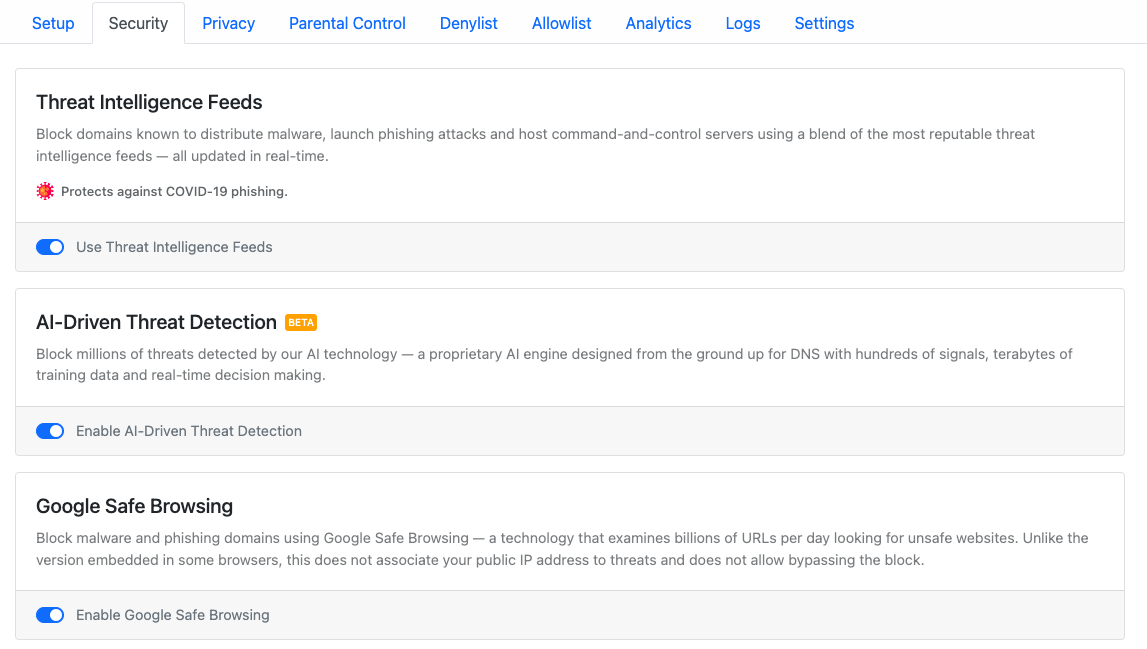
Navigate to **Security** options in the NextDNS dashboard. Here you'll be able to configure everything related to internet security.
**ENABLE ALL**
==============
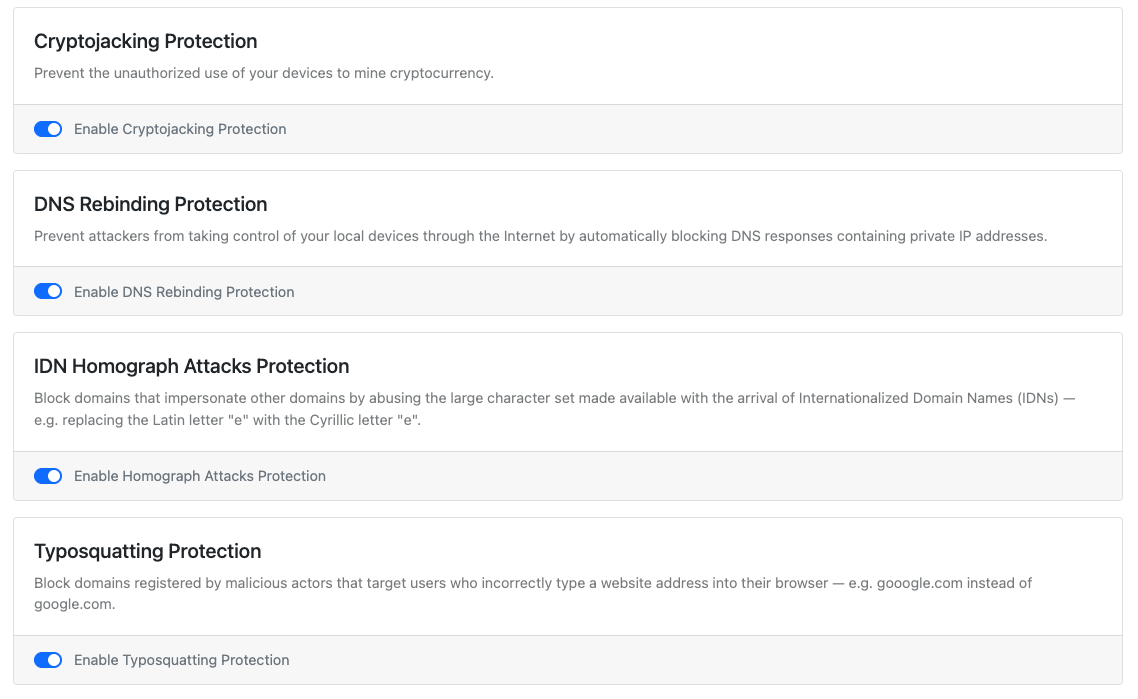
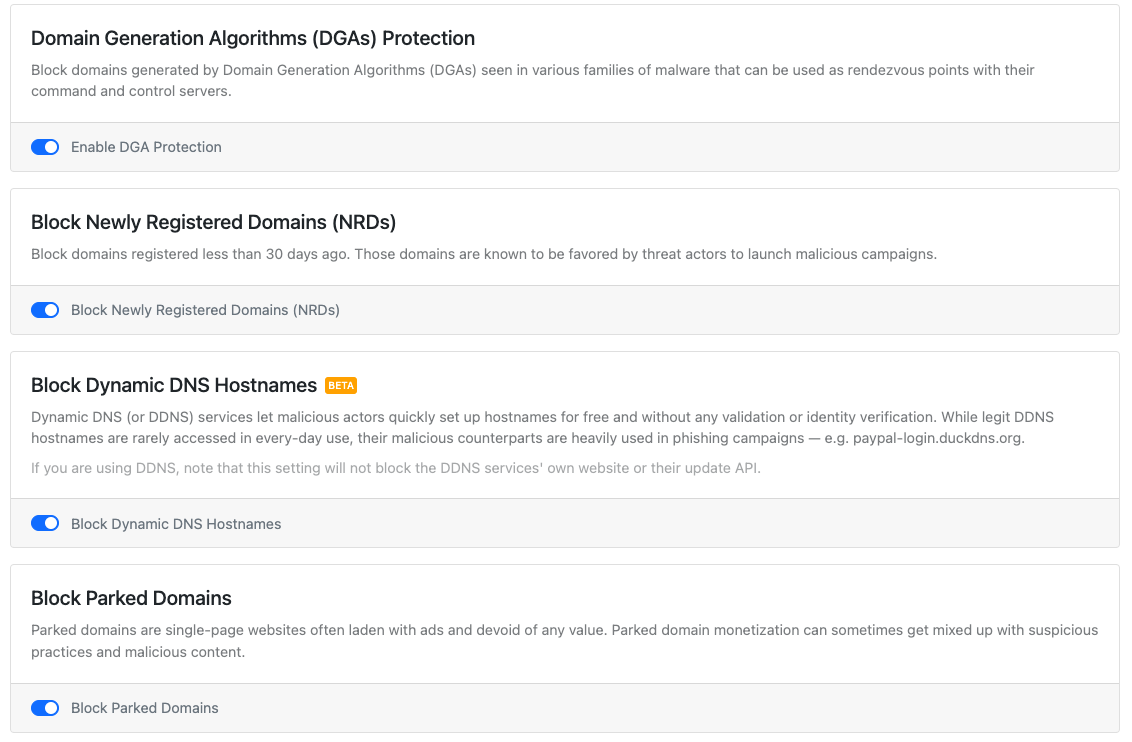
⚠️ Blocking [TLDs](https://geeksforgeeks.org/components-of-a-url) may cause [false positives](https://csrc.nist.gov/glossary/term/false_positive) since this feature blocks both site nagviations and subrequests. However, the entries below should allow for everyday browsing while offering protection against commonly abused TLDs since they have no known legitimate uses.
.cfd
.discount
.gdn
.loan
.loans
.ooo
.sbs
.zip
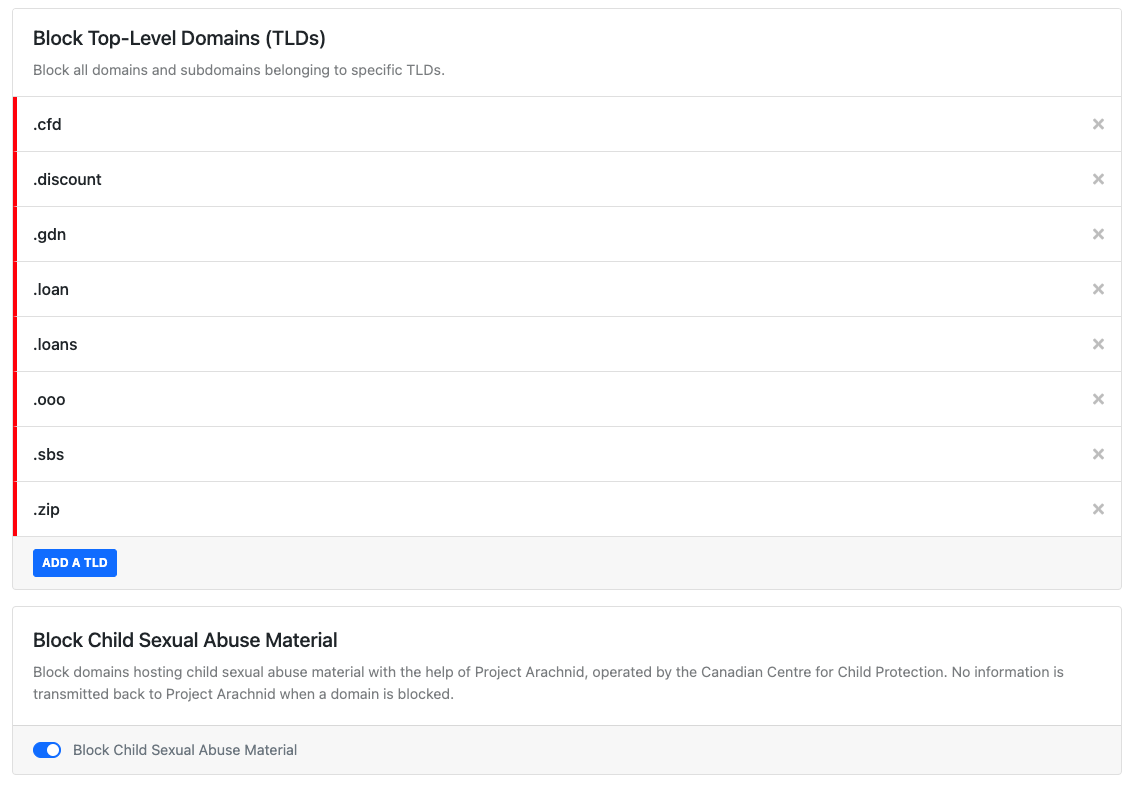
🛑 Below are additional TLDs you may block, but you may need to **allowlist** sites on occasion. _If you plan to_ [_set-and-forget_](https://glosbe.com/en/en/set-and-forget) _your configuration, skip this setting._
.fit
.surf
.cn
.monster
---
.agency
.bid
.buzz
.cf
.dad
.esq
.foo
.ga
.gq
.ml
.mov
.nexus
.phd
.prof
.pw
.ru
.tk
.top
.zone
* * *
3\. Privacy 🔒
--------------
Privacy features limit the amount of data companies can collect about you.
### Blocklists
Blocklists filter out ads, [trackers](https://freecodecamp.org/news/what-you-should-know-about-web-tracking-and-how-it-affects-your-online-privacy-42935355525/), and malicious sites. Hundreds of volunteers contribute to these lists in the [open-source](https://opensource.com/resources/what-open-source) community, and they are the undercover heroes who make blocking ads at scale possible.
We recommend you remove the [NextDNS Ads & Trackers Blocklist](https://github.com/nextdns/blocklists/blob/main/blocklists/nextdns-recommended.json) and select the [minimum](https://www.reddit.com/r/nextdns/comments/1048xeg/do_you_use_nextdns_blocklist_as_the_primary/j33wnz2/?context=3) number of useful lists.
#### Which blocklist should I use?
A great question to ask is: "How much do I want to deal with the inconveniences of [false positives](https://csrc.nist.gov/glossary/term/false_positive)?"
Here are the suggested blocklists:
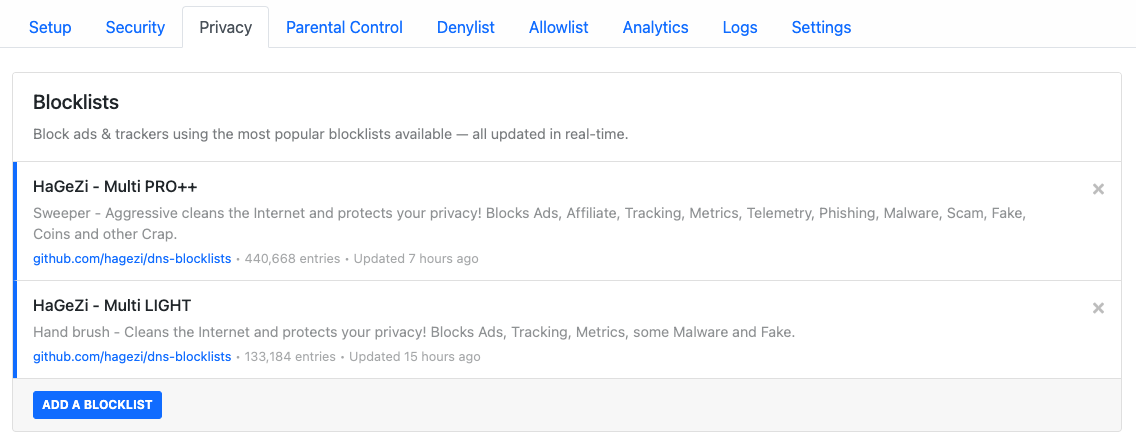
📖 Read the full analysis of Hagezi's lists [here](https://github.com/hagezi/dns-blocklists/discussions/1093).
💡 Use different blocklists on separate DNS profiles (e.g., LIGHT for your router and PRO++ for your web browser).
### Why Hagezi?
[Hagezi](https://github.com/hagezi/dns-blocklists) block ads, trackers, native device trackers, badware, and more. He maintains a sensible allowlist, handles false positives quickly, an communicates known issues to blocklists maintainers. Hagezi's primary DNS lists combine respected community blocklists like [OISD](https://oisd.nl/), [Steven Black](https://raw.githubusercontent.com/StevenBlack/hosts/master/hosts), [1Hosts](https://github.com/badmojr/1Hosts#safeguard-your-devices-against-pesky-ads-trackers-and-malware), [notrack](https://gitlab.com/quidsup/notrack#notrack), and [more](https://github.com/hagezi/dns-blocklists/blob/main/usedsources.md#proplus).
❓ You may wonder why other lists are not utilized. This is because many list maintainers:
* do not remove [false positives](https://csrc.nist.gov/glossary/term/false_positive) and/or are no longer active
* already [aggregate](https://www.reddit.com/r/nextdns/comments/ys3s1s/confused_about_blocklists/ivxdcd2/?context=3) common blocklists into their own list (Easylist/Fanboy, AdGuard, Steven Black, etc.)
* offer no meaningful additional coverage when compared with the chart combinations above
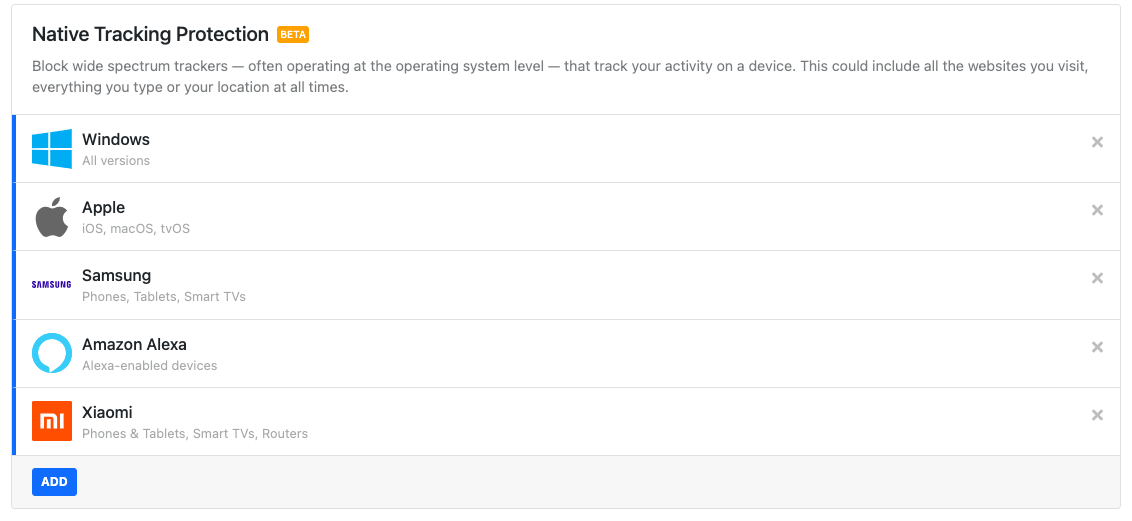
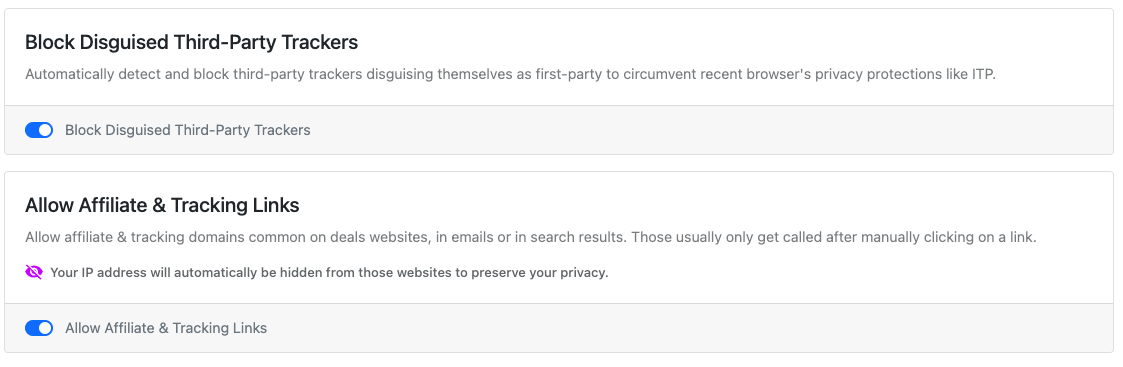
### Native Tracking Protection
Add all the device brands you use. There's no advantage in adding brands you don't have; however, there’s no disadvantage in adding unused brands, either.
Windows
Apple
Samsung
Xiaomi
Huawei
Amazon Alexa
Roku
Sonos
* * *
4\. Parental Control 👨👩👦
-----------------------------
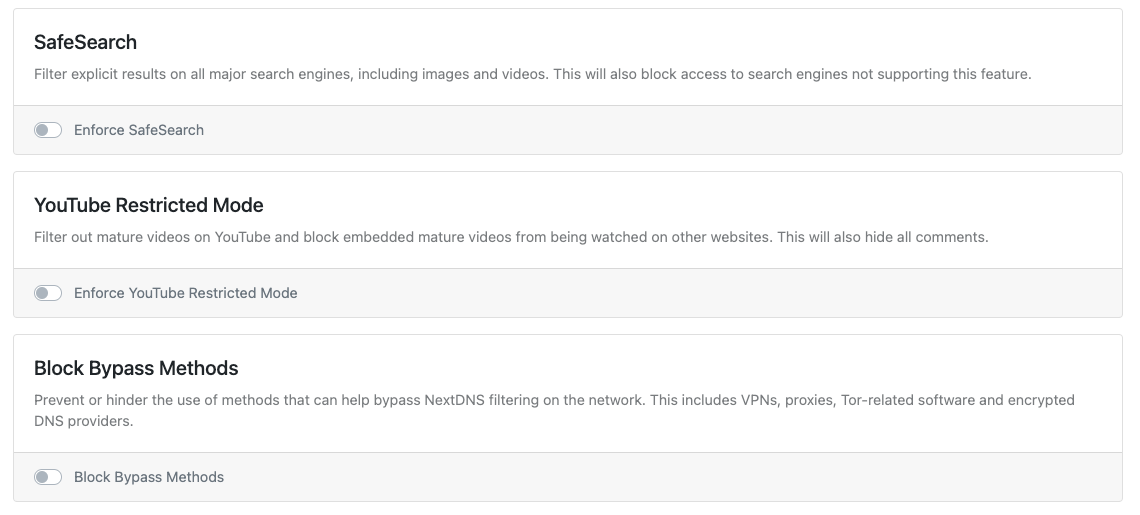
### YouTube Restricted Mode
Enforce YouTube Restricted Mode
### Block Bypass Methods
⚠️ Enabling may cause unintended breakage.
Block Bypass Methods
* * *
5\. Denylist ⛔
--------------
Denylist entries are always blocked. The entries below may further harden some profiles while not interfering with everyday browsing.
### Apple tracking domains
Not currently in NextDNS's Native Tracking Protection [**list**](https://github.com/nextdns/metadata/blob/6f9b6cd0670e7e31ad2ca716742088c2fc0616c2/privacy/native/apple):
xp.apple.com (unblock for device updates!)
acfeedbackws.icloud.com
api-adservices.apple.com
feedbackws.fe.apple-dns.net
feedbackws.icloud.com
iadsdk.apple.com
notes-analytics-events.apple.com
notes-analytics-events.news.apple-dns.net
weather-analytics-events.apple.com
weather-analytics-events.news.apple-dns.net
### Twitter tracker
syndication.twitter.com
### NVIDIA Gefore Experience
events.gfe.nvidia.com
* * *
6\. Allowlist ✅
---------------
Allowlist entries always resolve. These entries may be needed for aggressive DNS profiles to relax their rules.
### NextDNS
Just in case a filterlist goes [haywire](https://help.nextdns.io/t/m1hs207/energized-ultimate-lists-blocking-nextdns) and blocks your access
nextdns.io
### Facebook / Instagram
graph.facebook.com
graph.instagram.com
i.instagram.com
b-graph.facebook.com
If you're still having issues, try these:
connect.facebook.com
connect.facebook.net
graph-fallback.facebook.com
z-m-graph.facebook.com
graph-fallback.instagram.com
### Apple device updates
A [known tracking domain](https://gizmodo.com/apple-iphone-analytics-tracking-even-when-off-app-store-1849757558), but it's needed for device updates
xp.apple.com
### Apple Store
amp-api-edge.apps.apple.com
amp-api-search-edge.apps.apple.com
### Windows
This [request](https://oisd.nl/excludes.php?w=settings-win.data.microsoft.com) is blocked when using NextDNS' Native Tracking list (Windows)
settings-win.data.microsoft.com
### Google Nest usage metrics
logsink.devices.nest.com
### Yahoo Mail
consent.yahoo.com
guce.oath.com
pr.comet.yahoo.com
### Zoom
logfiles.zoom.us
us04logfiles.zoom.us
us04zpns.zoom.us
### YouTube history
s.youtube.com
### [**imgur**](https://imgur.com/)
js.media-lab.ai
### [Ghostery](https://ghostery.com/ghostery-ad-blocker) Analytics (opt-in)
User data is [removed](https://0x65.dev/blog/2019-12-04/human-web-proxy-network-hpn.html). Contributes to the [Human Web](https://0x65.dev/blog/2019-12-03/human-web-collecting-data-in-a-socially-responsible-manner.html) and [WhoTracks.me](http://WhoTracks.me) data
collector-hpn.ghostery.net
collector-hpn.privacy.ghostery.net
d.ghostery.com
* * *
**7\. Using NextDNS Analytics and Logs**
----------------------------------------
You can not only configure but also analyze your DNS server's activities and overall traffic. For example, if you are using this service solely for testing purposes, you can [check which trackers or domains are blocked](https://www.makeuseof.com/tag/check-who-tracking-you-online/) by NextDNS.
Moreover, it provides great visual statistics about total inquiries and blocked queries, as well as extra information about banned domains.
The "Logs" tab provides further details about the websites and domains being used. It also lets you search for and look at DNS requests that were sent to the NextDNS configuration.
* * *
8\. Settings ⚙️
---------------
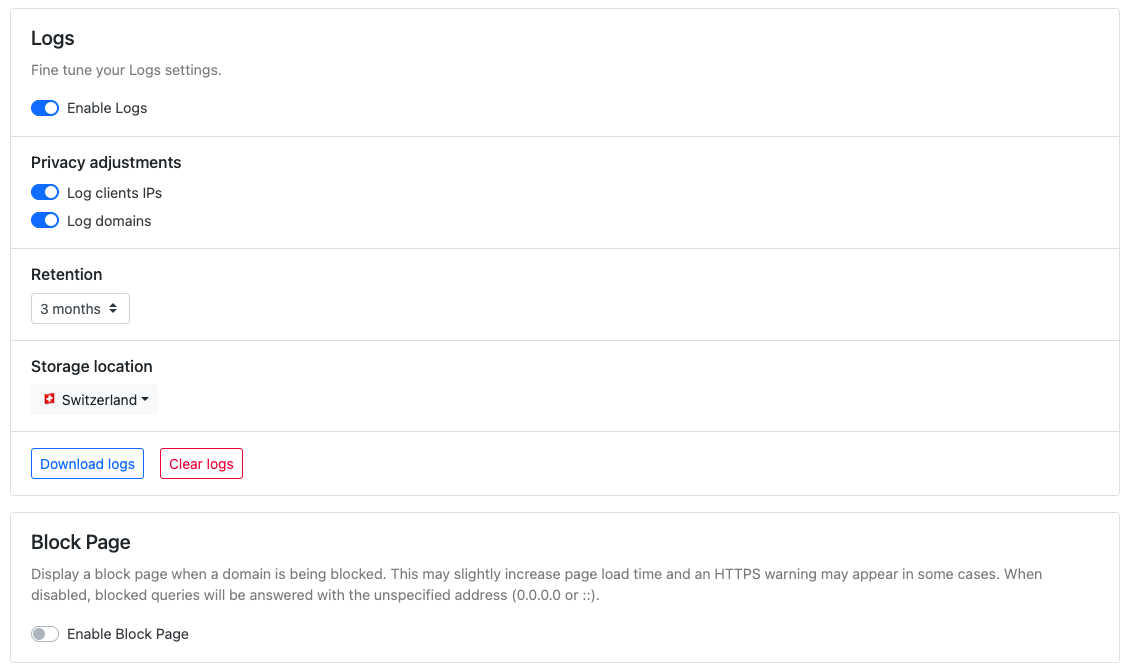
**Storage location** → Switzerland
### Block Page
⚠️ Enabling may cause breakage if the [NextDNS Root CA](https://help.nextdns.io/t/g9hmv0a/how-to-install-and-trust-nextdns-root-ca) is not on your devices. This setting also [breaks](https://help.nextdns.io/t/g9hdska) iCloud [Private Relay](https://support.apple.com/en-us/HT212614), [Yahoo! Mail](https://github.com/hagezi/dns-blocklists/issues/269#issuecomment-1409644343), and the [NAVER](https://channelsearch.naver.com/) app.
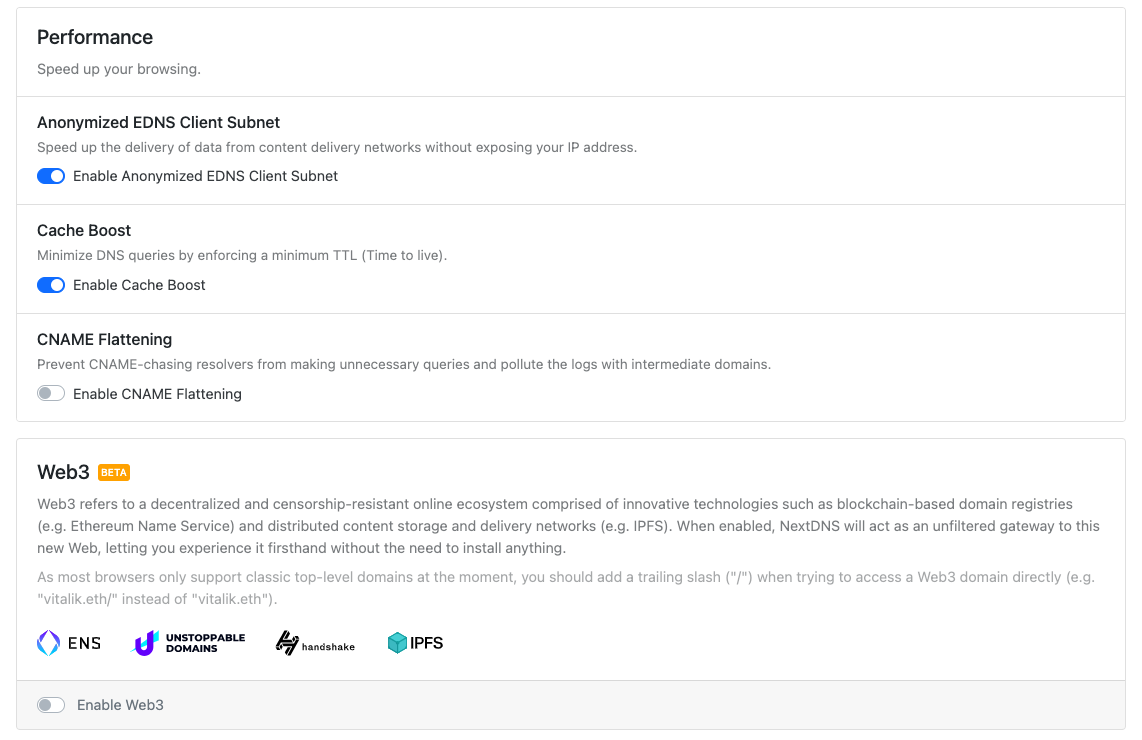
**Enable Web3 → (optional)**
* * *
How do I signup for NextDNS?
============================
Click [here](https://nextdns.io/?from=2wpdbg37).
[

https://nextdns.io
NextDNS
-------
NextDNS protects you from all kinds of security threats, blocks ads and trackers on websites and in apps and provides a safe and supervised Internet for kids - on all devices and on all networks.
](https://nextdns.io/?from=2wpdbg37)
Should I pay for NextDNS?
=========================
For the rich features it provides, [NextDNS](https://nextdns.io/?from=2wpdbg37) is very affordable at $19.90/year for unlimited devices. NextDNS pays for itself if it saves my family from a malicious incident.
* * *
**9\. Settings Up NextDNS on Different Devices**
------------------------------------------------
NextDNS is compatible with a wide variety of devices. Whether you're an **Android or iOS user, or prefer Windows or macOS**, NextDNS is compatible with them all.
In addition, you can easily set up this great DNS service on a wide range of browsers, routers, and even Chrome OS.
The NextDNS team has done a great job simplifying the setup process on the dashboard itself. To find the setup instructions, follow these steps:
1. Open your NextDNS dashboard.
2. Click the **Setup** tab.
3. Scroll down, and you'll find a **Setup Guide** section.
4. Click your device name from the device's list.
* * *
### **Unlimited Configuration & Unlimited Devices**
No matter whether you are a paid subscriber or a free user, you can create many configurations (i.e. different rules and options for a group of devices) and can also connect to an unlimited number of devices.
This gives you the potential to secure many devices at your home, and workplace. This should be incredibly useful if you have several devices at your disposal.
### **Speed Up Your Browsing**
With NextDNS, you can also try improving your browsing experience. You get a few options to tweak.
For instance, you can cache the DNS queries to improve the load time.
**Secure Your Browsing Experience with NextDNS**
------------------------------------------------
With all the added benefits of securing, monitoring, and restricting internet activity, NextDNS could prove to be an all-in-one tool.
Of course, you don't need all the features to start with—you get to tweak what you want and what you do not. It is completely free to start using NextDNS, so see if it makes a difference in your browsing experience now!
* * *
YouTube
=======
[](https://www.youtube.com/watch?v=WUG57ynLb8I)
* * *
**_If you're enjoying today's newsletter, why not share it with your friends? They might find it just as informative and entertaining as you do._**
**_Sharing is caring, and by spreading the word about this newsletter, you're helping to support ME and ensure that more great content gets produced in the future. Plus, you'll get to have even more conversations with your friends about the interesting topics covered in each edition.
_**
**There are three ways to show me that you enjoyed reading this article:**
1. **Share this post with your friends**
[Share](https://paragraph.xyz/@kazani/uy2iTFlyDFnNwvGcHcAK)
* * *
2. **Subscribe to my newsletter**
[Subscribe](https://paragraph.xyz/@kazani/subscribe)
* * *
3. **Collect this post (only 100 mints available)**
[Collect](https://paragraph.xyz/@kazani/uy2iTFlyDFnNwvGcHcAK)
* * *
**I hope this was helpful!**
**Thank you for reading!**
**Let’s bust some more in next article.**
* * *
**If you want more, be sure to**
[**FOLLOW ME**](https://owl.link/kazani.btc)
============================================
---
*Originally published on [The BlogChain Newsletter](https://paragraph.com/@kazani/what-is-nextdns)*