
The Sunset of X2Y2
To our incredible X2Y2 community, Three years ago, on February 6, 2022, we launched the beta of X2Y2 with all of you by our side. What a ride it's been. Together, we built something extraordinary—peaking as the 2nd largest NFT marketplace behind OpenSea, racking up $5.6 billion in all-time trading volume, and even today, holding strong as the 3rd largest in the game (via TokenTerminal). I look back on those wild days—the highs of the NFT boom, the lows of its fade—with nothing but gratit...
About X2Y2 staking rewards
Around two hours ago, the X2Y2 staking halving kicked in on block #14408224, and we noticed the APR dropped from ~1000% to ~160%, much lower than the expected 500%. After investigating the issue further, we discovered that a mistake was made in setting the initial parameters of the staking rewards contract.The first table shows the planned distribution of tokens while the second table shows how they were actually distributed as a result of the error. The error resulted in per stage having ins...

X2Y2 Pro Partners with MARBLEX and Support Klaytn Network
X2Y2 Pro is pleased to announce a strategic partnership with MARBLEX, the blockchain subsidiary of Netmarble Corp. X2Y2 Pro is pleased to announce that it will support the Klaytn network and will officially handle and become the preferred marketplace for MARBLEX's second NFT collection(https://medium.com/marblex/ann-revealing-of-marblership-lunar-animals-269ad0a26b77 ), "Marblership Lunar Animals," scheduled for release in March 2024. MARBLEX Playground is a user-friendly ecosystem that ...
>200 subscribers

The Sunset of X2Y2
To our incredible X2Y2 community, Three years ago, on February 6, 2022, we launched the beta of X2Y2 with all of you by our side. What a ride it's been. Together, we built something extraordinary—peaking as the 2nd largest NFT marketplace behind OpenSea, racking up $5.6 billion in all-time trading volume, and even today, holding strong as the 3rd largest in the game (via TokenTerminal). I look back on those wild days—the highs of the NFT boom, the lows of its fade—with nothing but gratit...
About X2Y2 staking rewards
Around two hours ago, the X2Y2 staking halving kicked in on block #14408224, and we noticed the APR dropped from ~1000% to ~160%, much lower than the expected 500%. After investigating the issue further, we discovered that a mistake was made in setting the initial parameters of the staking rewards contract.The first table shows the planned distribution of tokens while the second table shows how they were actually distributed as a result of the error. The error resulted in per stage having ins...

X2Y2 Pro Partners with MARBLEX and Support Klaytn Network
X2Y2 Pro is pleased to announce a strategic partnership with MARBLEX, the blockchain subsidiary of Netmarble Corp. X2Y2 Pro is pleased to announce that it will support the Klaytn network and will officially handle and become the preferred marketplace for MARBLEX's second NFT collection(https://medium.com/marblex/ann-revealing-of-marblership-lunar-animals-269ad0a26b77 ), "Marblership Lunar Animals," scheduled for release in March 2024. MARBLEX Playground is a user-friendly ecosystem that ...
Share Dialog
Share Dialog


If you cannot make a repayment in x2y2.io due to any unexpected problems during the loan repayment process, you can simply make the repayment via the loan contract.
This article will guide you through step by step.
Before you start, please make sure you have the following information:
1. The Loan ID of which you need to make the repayment. Below are two ways to obtain the ID:
To obtain the Loan ID check the ‘Borrower Note Ticket NFT’ already mortgaged in your borrowing wallet.
You can also check your email. If you have binded your email address, please check the notification email you received with the subject ‘Upcoming due for loan’. Your Loan ID number will be the numbers following ‘Your loan #’.
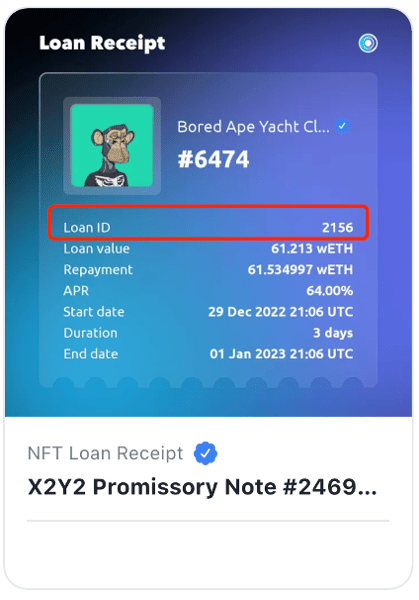
2. Make sure you have sufficient tokens in the wallet to repay the loan. (The repayment wallet does not have to be your own wallet)
Visit the website page etherscan. io for WETH.
1. Click on the button that says Connect to Web3 which shall take you to your wallet.
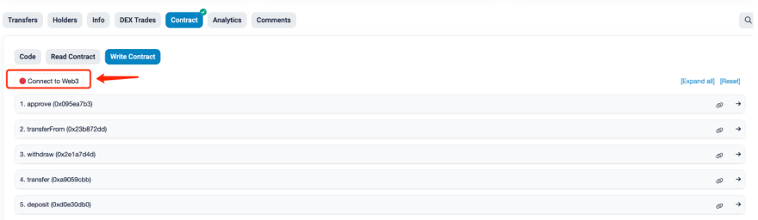
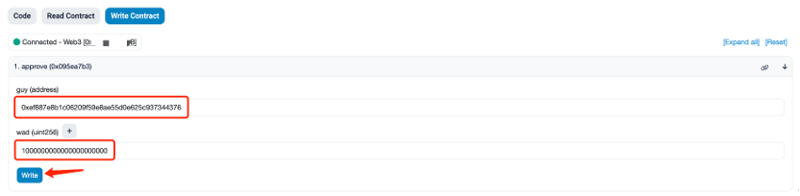
2. Expand the function section of 1.approve( 0x095ea7b3).
3. Under guy (address) please fill in the following code 0xef887e8b1c06209f59e8ae55d0e625c937344376.
4. Under wad (uint256) please fill in the following code 1000000000000000000000. (Approving 1000 ETH. You can adjust this number as you wish.)
5. Click on the button Write to confirm the on-chain transaction in your wallet.
1. Open the webpage etherscan.io for x2y2 loan.
2. If you cannot be connected, please click on the button Connect to Web3 to access your wallet.
3. Expand the function section 19.repay (0xe7610eb1).
4. Fill in your loan ID under _loanId (uint32) .( LoanID is a decimal number, which needs to be converted to hexadecimal here)
5. Click on the button Write to confirm the transaction in your wallet.

Once the transaction is confirmed on the blockchain, your loan will be repaid, and the loan status will be updated in x2y2 within 1-2 minutes.
For more information, please go to https://x2y2.io
If you cannot make a repayment in x2y2.io due to any unexpected problems during the loan repayment process, you can simply make the repayment via the loan contract.
This article will guide you through step by step.
Before you start, please make sure you have the following information:
1. The Loan ID of which you need to make the repayment. Below are two ways to obtain the ID:
To obtain the Loan ID check the ‘Borrower Note Ticket NFT’ already mortgaged in your borrowing wallet.
You can also check your email. If you have binded your email address, please check the notification email you received with the subject ‘Upcoming due for loan’. Your Loan ID number will be the numbers following ‘Your loan #’.

2. Make sure you have sufficient tokens in the wallet to repay the loan. (The repayment wallet does not have to be your own wallet)
Visit the website page etherscan. io for WETH.
1. Click on the button that says Connect to Web3 which shall take you to your wallet.

2. Expand the function section of 1.approve( 0x095ea7b3).
3. Under guy (address) please fill in the following code 0xef887e8b1c06209f59e8ae55d0e625c937344376.
4. Under wad (uint256) please fill in the following code 1000000000000000000000. (Approving 1000 ETH. You can adjust this number as you wish.)
5. Click on the button Write to confirm the on-chain transaction in your wallet.

1. Open the webpage etherscan.io for x2y2 loan.
2. If you cannot be connected, please click on the button Connect to Web3 to access your wallet.
3. Expand the function section 19.repay (0xe7610eb1).
4. Fill in your loan ID under _loanId (uint32) .( LoanID is a decimal number, which needs to be converted to hexadecimal here)
5. Click on the button Write to confirm the transaction in your wallet.

Once the transaction is confirmed on the blockchain, your loan will be repaid, and the loan status will be updated in x2y2 within 1-2 minutes.
For more information, please go to https://x2y2.io
No comments yet