

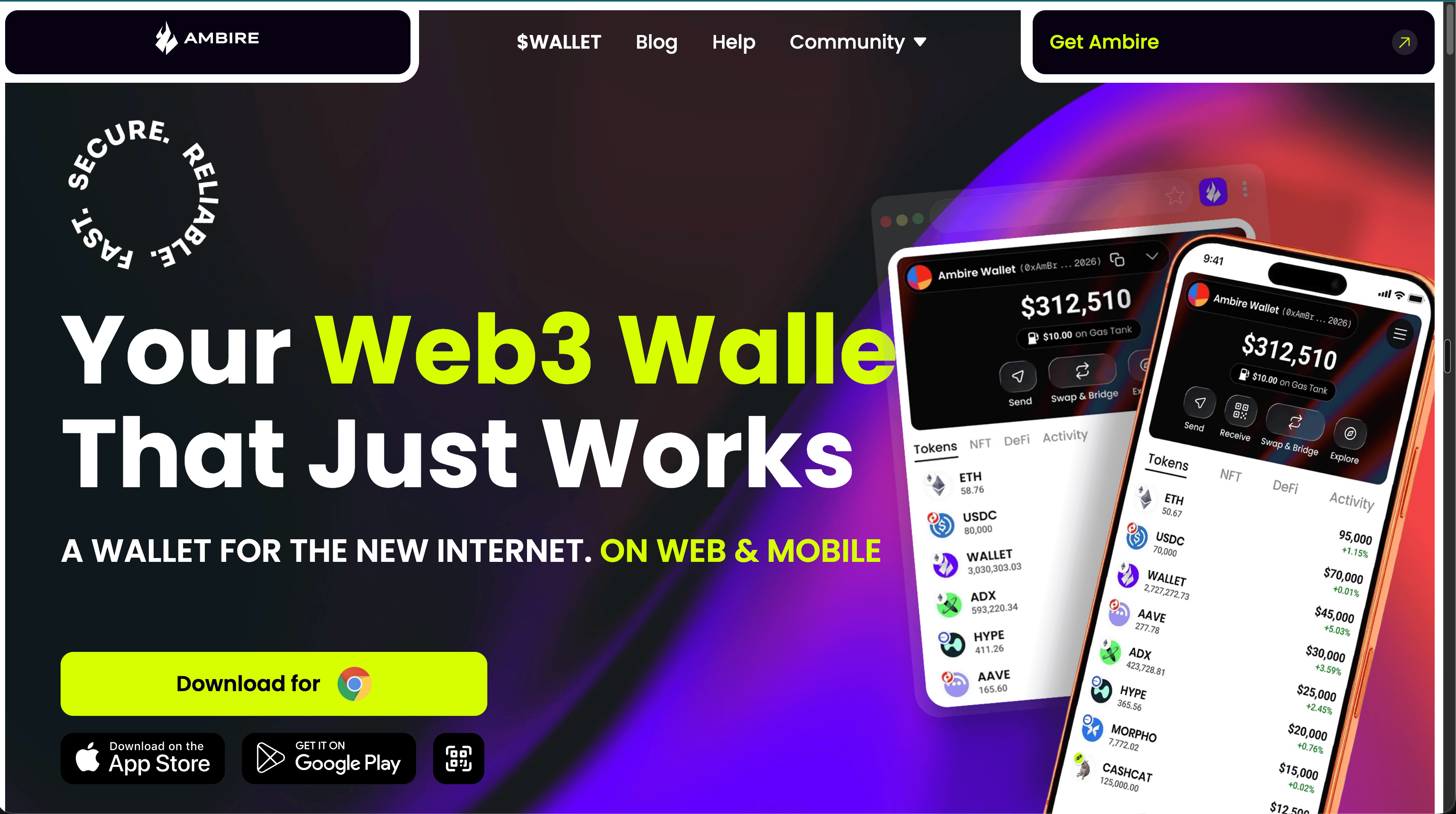
I went to their website and downloaded the Chrome extension.
Pretty simple.
Something that catches my eye is a Customize button.
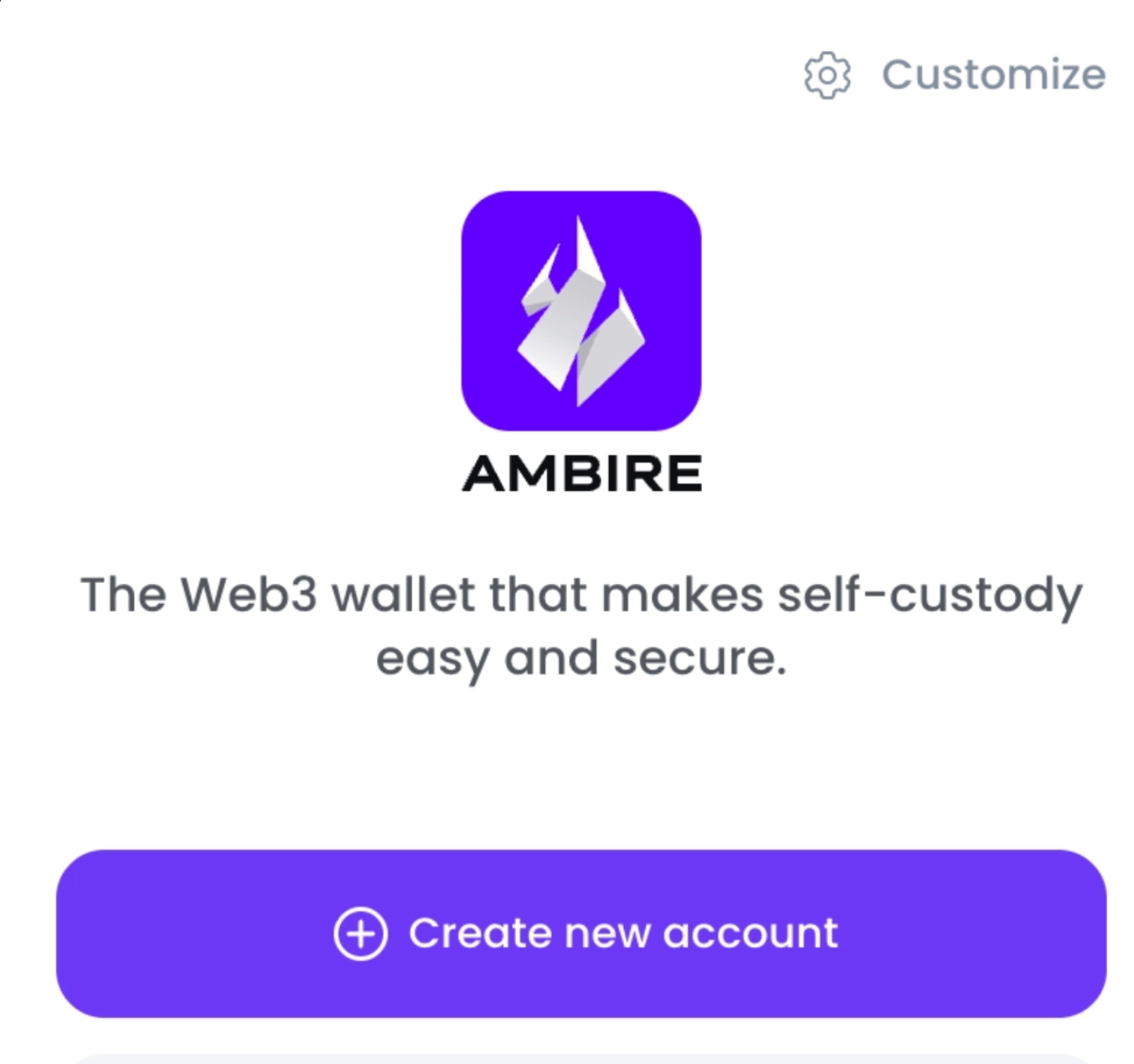
I have no idea what I'm customizing yet, but I'm in exploration mode, so obviously I click it.
And suddenly I'm configuring RPCs, privacy settings, ERC-4337, and ERC-7702??
Okay, things escalated quickly.
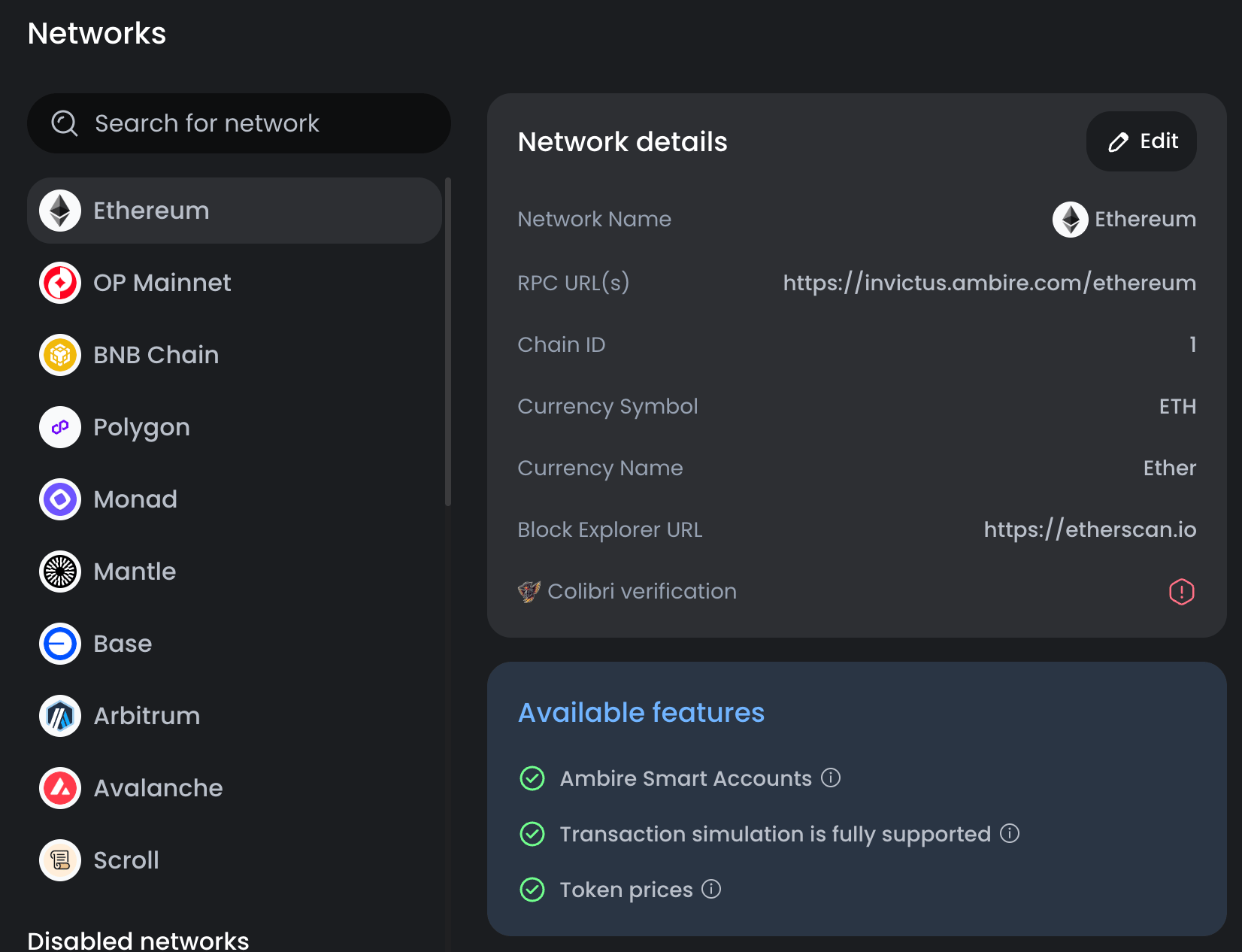
I understand why these settings exist.
I actually like that Ambire exposes these controls to users. The problem is that the interface shows me the options without giving me enough context to choose confidently.
If you're going to expose settings that are not common for the average user, the UX should make them approachable enough that users can either understand the tradeoff immediately or easily go one level deeper.
A short explanation, tooltip, docs link, or even a quick video could move users from having no idea what it does into “I understand the tradeoff of this setting, and I can decide for myself.”
That is mostly important for privacy and account settings, where giving users control is great, but that same control without proper context isn't really empowering and it makes the user feel that the product is designed for a more experienced audience.
I see Privacy Opt-outs.
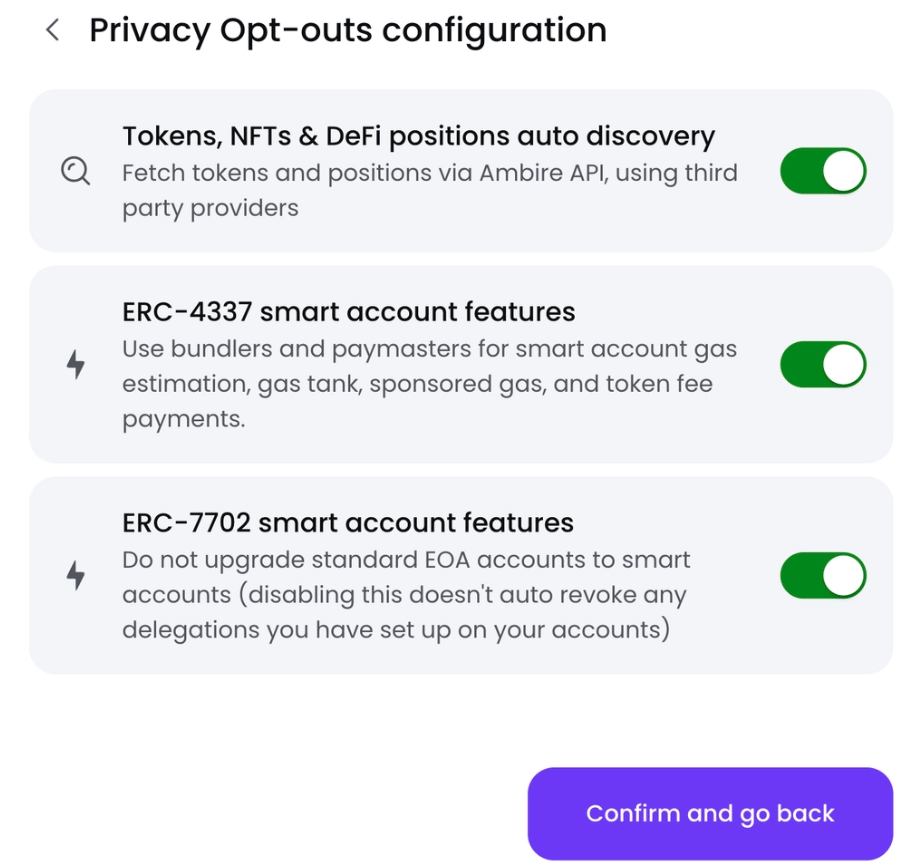
This immediately sounds interesting to me.
For example:
Tokens, NFTs & DeFi positions auto discovery
The description tells me Ambire uses third-party providers to discover my assets, cool.
And apparently I can opt out, also cool!
But what exactly am I opting out of? What information does the third party receive? What functionality do I lose if I disable it? What privacy risk am I reducing?
The UI gives me the control without giving me enough context to make the decision.
This is a perfect place for progressive disclosure inside the setting itself (same conclusion as with the RPC settings)
The same thing happens with ERC-4337 and ERC-7702.
I know what they are at a high level, but even then, I'm not immediately confident about the pros and cons of enabling or disabling each one.
For a less technical user, ERC-4337 and ERC-7702 are basically meaningless labels.
The screen might as well say:
Enable wallet plugin #1: ON
Enable wallet plugin #2: ON
Obviously I'm leaving both on.
But I still have no idea what decision I just made. Which brings me to the next problem.
After poking around the settings, I create a password.
And suddenly it looks like I already have an account!
That was fast.
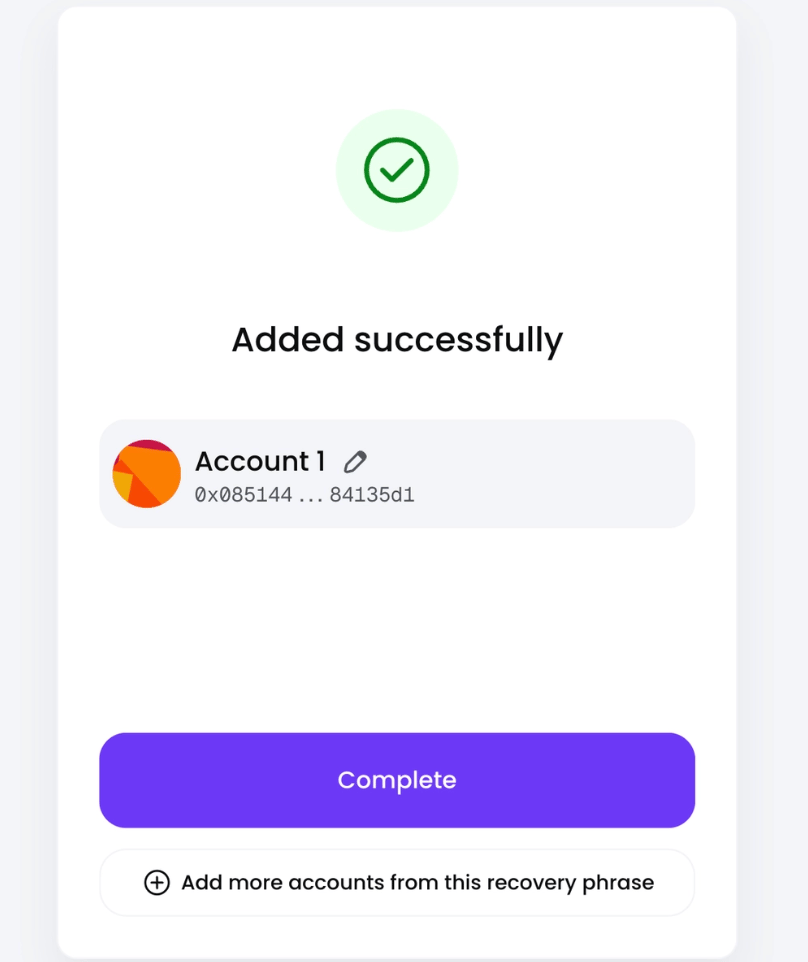
Then I see:
Add more accounts from this recovery phrase. Interesting. Click.
Now I can choose between "multiple addresses derived from the same recovery phrase."
Except...
I don't remember ever backing up a recovery phrase!
So now I'm trying to understand the security model while I'm still onboarding. Is my wallet currently recoverable? Is the password the recovery mechanism? Was a seed already generated? Do I need to do something else?
I guess the product knows the answer, but I don't.
That's an important gap in a wallet onboarding flow because users should always know their security state without having to infer it.
Then I see a section called Smart accounts.
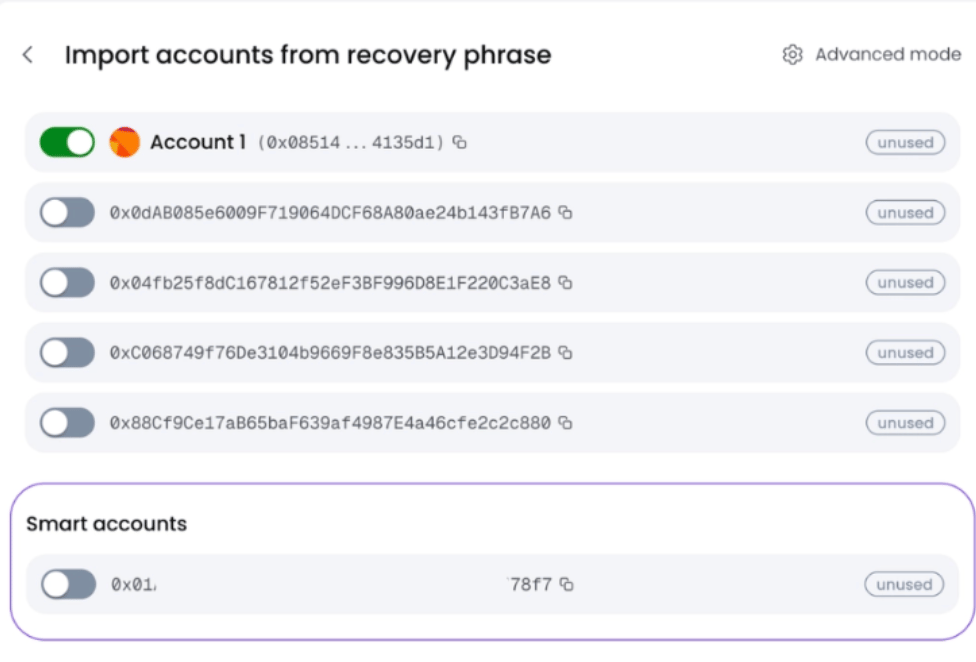
There's only one. What exactly makes this account smart, and why is there only one?
But come on! It's called a Smart Account, of course I enable it!
Who is voluntarily choosing the dumb account?
This is one of those naming problems where the label itself nudges the user toward an option without explaining the tradeoff. If two account types behave differently, I'd rather understand:
Standard account: Works like a traditional Ethereum account.
Smart account: Adds X, Y and Z capabilities, with these tradeoffs.
Now I'm making an informed decision instead of clicking the one that sounds better.
If there’s no tradeoff, why make users choose instead of making the better option the default??
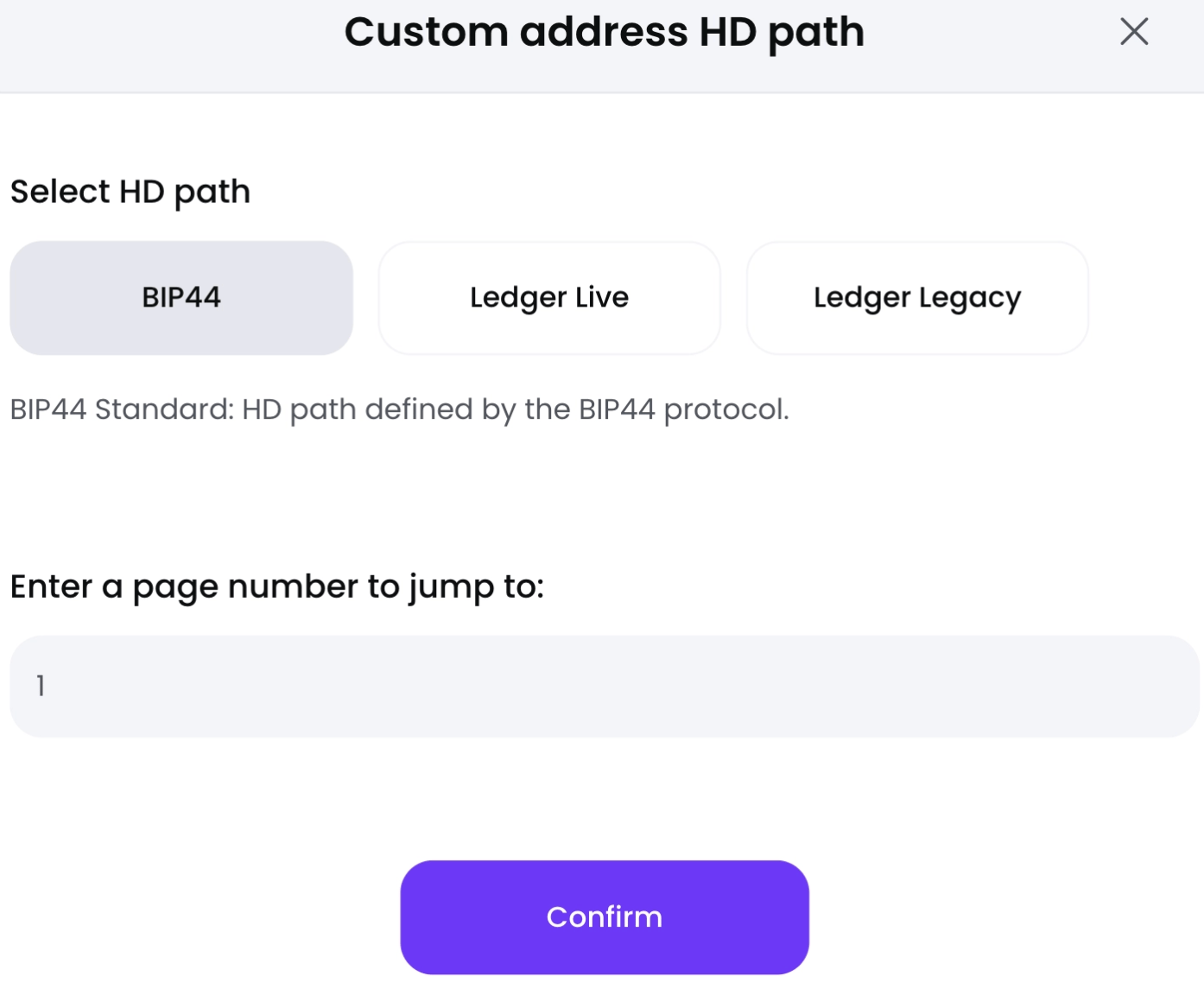
There's an Advanced Mode button. Click
And yes... As expected, I understand almost nothing.
To be fair, the button did warn me.
HD path.
BIP44.
Oh, Ledger Live! I know that one.
Ledger Legacy.
No idea.
Then:
Enter a page number to jump to
A page of what?
At this point I've learned something important about myself: I am not advanced in wallet derivation paths, and that's actually okay.
I leave everything exactly as it is and move on.
I import my accounts, I can now see both of them.
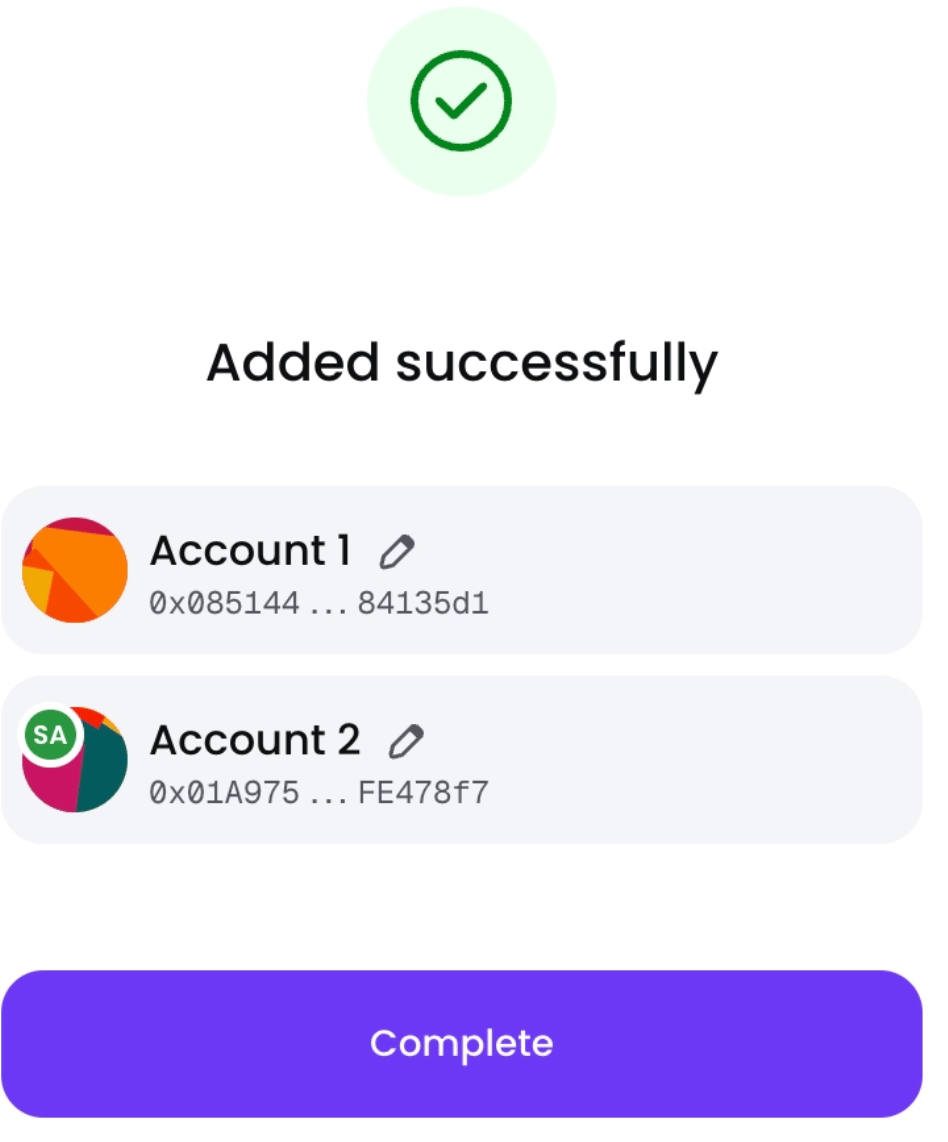
One has an SA badge, I'm going to assume that means Smart Account.
I finish setup.
Ambire reminds me to pin the extension for easy access, Nice touch.
I open it, and... Boom.
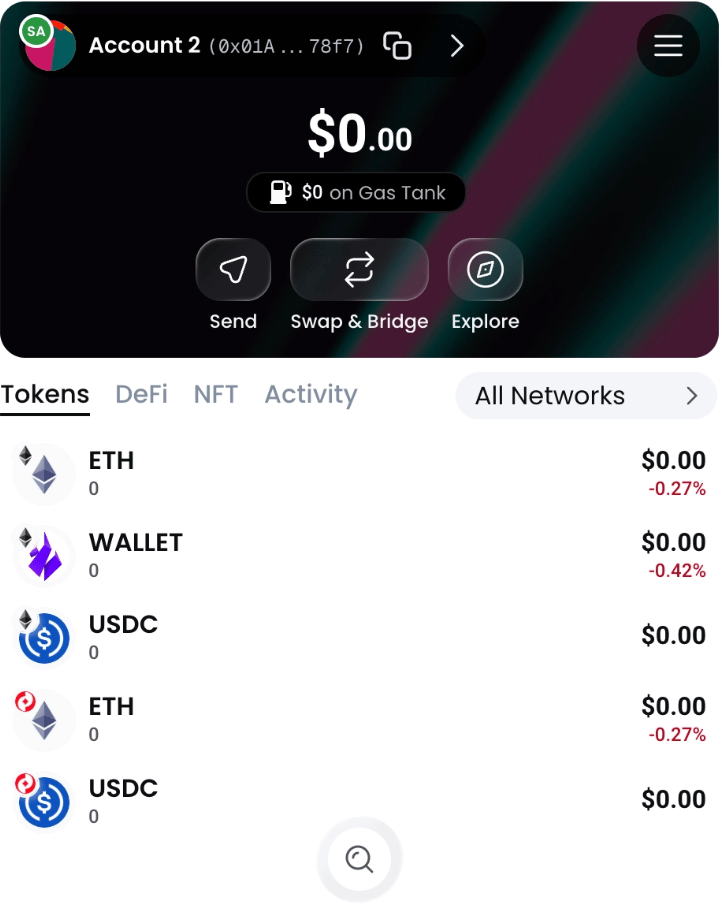
I really like what I see.
The card layout is clean, liquid-glass-style buttons look good, the hierarchy is simple.
Send - Swap & Bridge - Explore.
Balance front and center.
This feels like a wallet.
I send myself some ETH on Base, the funds arrive.
It's immediately clear that I'm looking at ETH on Base, nice.
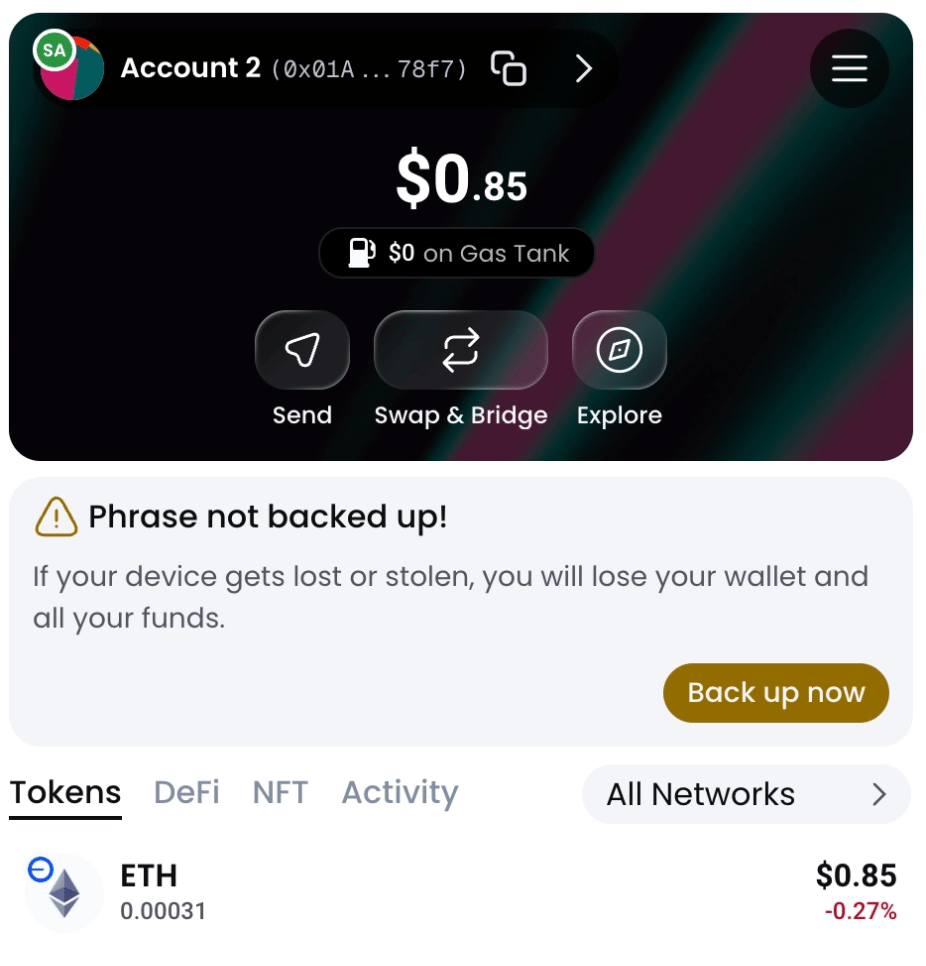
Then I notice a warning:
Phrase not backed up!
Wait, this confirms the confusion I had earlier.
The onboarding let me reach a "wallet created successfully" state before I fully understood my recovery state.
For a self-custodial wallet, that's a pretty important distinction.
There's a difference between:
Your wallet has been created
Your wallet is safely recoverable
Those states should feel very different.
That doesn’t mean I want to write down my seed phrase as soon as I start onboarding. I just want to know whether it’s backed up before I send money.
I back up the seed phrase, write it down, now I'm SAFU.
Let's do some DeFi.
I go to Uniswap and connect the wallet.
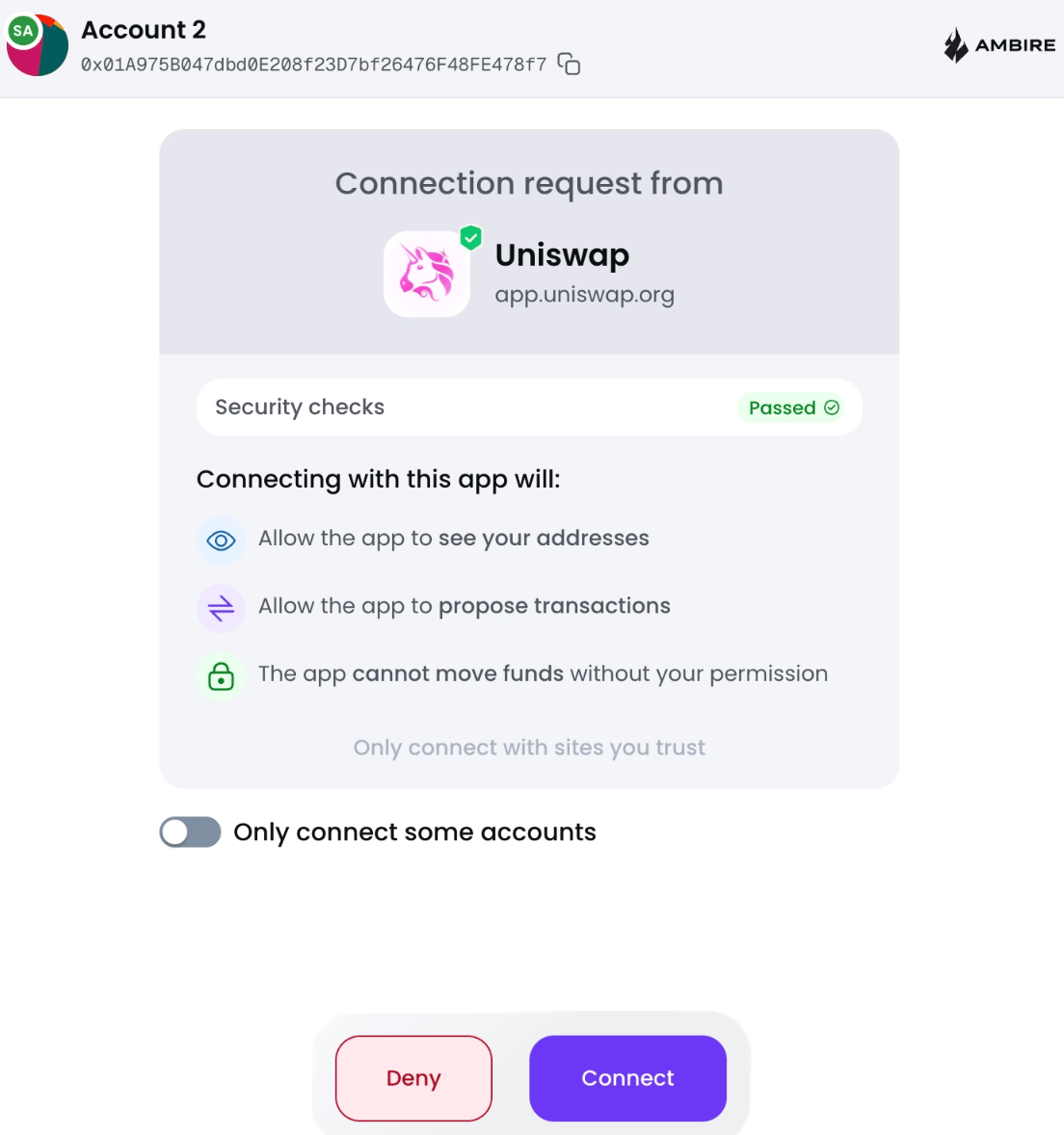
This might be one of my favorite screens in the whole experience.
Instead of simply asking:
Connect? Yes / No
Ambire explains what the connection actually allows:
The app can see my addresses
The app can propose transactions
The app cannot move funds without my permission
And there's a visible Security checks passed indicator.
This is good trust UX.
You're giving me information at exactly the moment I need it. I don't need to understand WalletConnect permissions beforehand. I just need enough information to confidently answer:
"Is it safe for me to connect to this app right now?"
This screen does that really well.
Time to swap.
The transaction confirmation window appears.
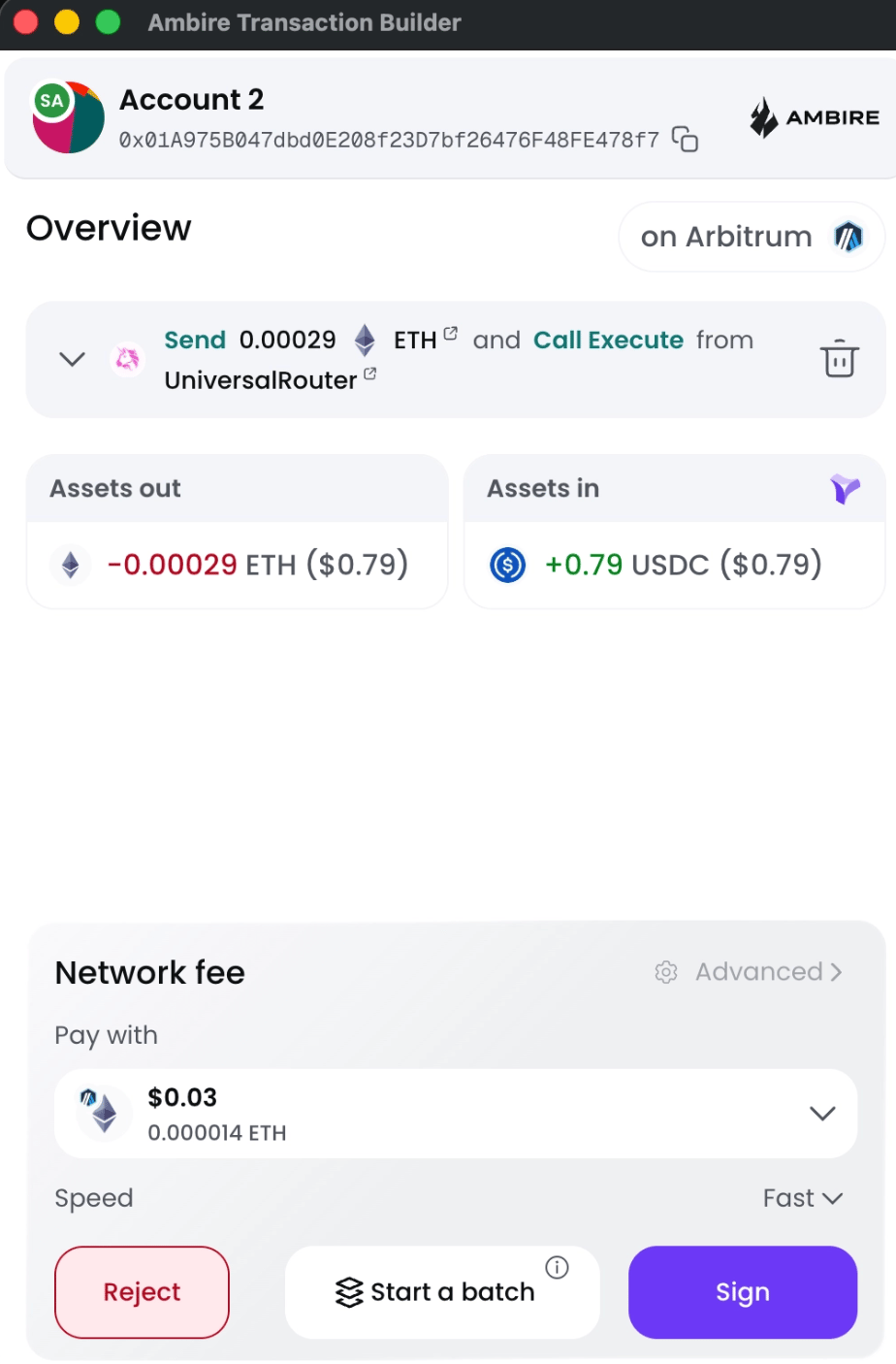
For some reason, it opens in the middle of my screen instead of staying on the side.
Maybe this is configurable, maybe it's browser behavior, I'm not sure. But I don't love it.
When I'm signing a transaction, I usually want to compare what the dApp says with what the wallet says, putting the wallet over the application forces a small context switch.
I now have to mentally remember what I was doing rather than visually comparing both interfaces side by side.
For low-risk transactions, whatever, but for a transaction involving serious money, that matters.
I want the signing interface close enough to inspect, but not blocking the context I'm trying to verify.
The actual transaction confirmation UI is really clean.
Assets out
Assets in
That's the mental model I care about, I don’t care about calldata and contract execution details.
Tell me:
What am I losing? What am I receiving?
Very good.
One small thing I'd improve is the reliance on red and green to communicate direction. It's obvious to me right now that Red means Out and Green means In, but color shouldn't be the only signal.
Color blindness exists, screens can have weird color profiles, sometimes I literally use red-filter glasses.
A tiny arrow, + / - on the titles, or incoming/outgoing icon would make the state redundant across multiple visual cues.
That's good accessibility through redundant encoding.
Then I get to the network fee. Wait...
I can choose what asset I use to pay gas? Okay, this is cool. Is this what a smart account means??
Notice the difference:
During onboarding "ERC-4337 smart account features"
Me: ????
During an actual transaction "Pay your network fee with another asset"
Me: Ohhhh, I want that.
Same technology/configuration but completely different level of comprehension for the user.
Don't sell me ERC-4337 or weird jargon, just sell me "You don't need ETH for gas"
Then I notice Start a batch.
And thankfully there's an info icon. Click.
Now I understand what the feature does, Great!
That's exactly the contextual education I was missing earlier.
I try batching two transactions together.
Approve.
Sign, smooth.
Boom!
Done.
RPC configuration, ERC-4337, ERC-7702, HD paths, BIP44, Smart Accounts.
These are powerful features, but for the average user they're still mostly implementation details.
The experience gets much stronger when Ambire translates those same capabilities into actual user benefits:
Pay gas with different assets.
Batch multiple transactions.
Understand exactly what a dApp can do before connecting.
The product should lead with the benefit, then reveal the mechanism when the user wants to understand more.
Ambire is at its best when it explains outcomes instead of standards.
I don't think Ambire should remove advanced functionality, quite the opposite, power users will love having it.
The issue is when the complexity appears.
A first-time wallet setup should optimize for:
Create wallet → Understand recovery → Back it up → Start using it
Then progressively expose:
Smart account configuration → RPCs → derivation paths → privacy controls
Right now, some of the most technical decisions arrive before I've even formed a basic mental model of my wallet.
The moment where I thought setup was complete, then later discovered my recovery phrase wasn't backed up, was the biggest trust friction for me.
In a self-custodial product, the difference between:
wallet created and wallet safely backed up
can't be subtle.
The weird thing about Ambire is that the experience got better the deeper I went.
The onboarding exposed me to RPCs, account standards, derivation paths, and privacy configuration. Then I reached the actual wallet, and everything became pretty intuitive.
Once I started using dApps, some of the smart account features genuinely impressed me.
So my takeaway isn't that Ambire is too complicated but that it shows me the complexity before showing me why I should care.
The product already knows how to abstract crypto, I'd like it to do that from click one.