

Founding Pods & Co-Leaders
Check-in codes you can trust
Sign-in now tells you when your browser is blocking it
Under the hood
One ask
Upcoming events
Every community begins with someone willing to go first.
Until now, creating a pod asked you to name several leaders up front. That doesn't fit how communities actually start, and it meant other people's names could be added without them knowing.
Now you can found a pod by yourself. When you create one, you're its leader from the start. If you want co-leaders, you can still add them in the form or invite them later from the pod page, and they'll be invited rather than signed up.
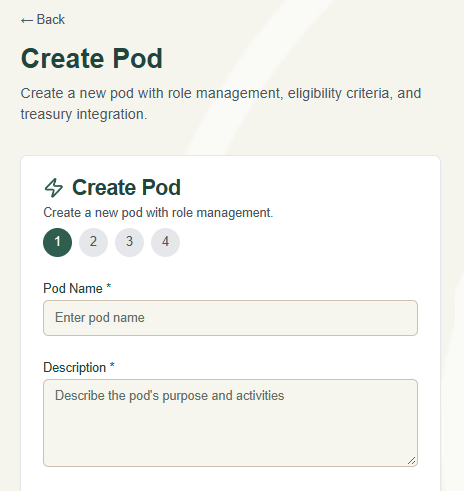
Being a pod leader is a real commitment. You help welcome members, run governance, and look after shared funds. So nobody becomes a leader just because someone typed their name in.
An invitation, not an assignment. When you invite someone to co-lead, they get a notification. On the pod page they'll see "You're invited to co-lead," with Accept and Decline buttons.
They become a leader only after accepting. If they decline, the invitation simply goes away.
Bigger pods decide together. In a pod with one leader, that leader's invitation is enough. In a pod with several, inviting counts as your vote, and a majority of leaders must agree.
Leaders can see who hasn't replied yet, right on the pod page.
The same rule now governs leadership generally. New leaders join through an approved application, which needs agreement from at least half of a pod's current leaders. Leaders can step down but can't remove each other from the list directly; removing someone from a leadership role goes through the members panel, which checks the blockchain record of who holds the role first. And a pod's founder can't be changed.
Day to day, nothing looks different. These rules live in the database itself, so they hold no matter how someone tries to make the change.
When you register for an event, the app gives you a QR code to show at the door. Those codes had a real problem that we addressed this past week.
The old code's signature was just a scrambled copy of the event ID and wallet address, which anyone with the motivation to do so could recompute. That meant anyone could produce a valid-looking code for any registration. The scanner also never confirmed that the registration in the code belonged to the wallet in it, so an organizer could see one person's name while checking in someone else's registration.
Codes are now signed by our server, and the server checks each one when an organizer scans it. It confirms the signature, the expiry, the event, and that the registration still belongs to the person showing it. A code can't be copied, edited, or made up. We tested this end to end against production, including with edited codes, wrong keys, expired codes, and codes whose registration had changed hands. All were refused.
Nothing changes for you. Your code is on the event page, as before. If you saved one a day or more ago, reopen the event page for a fresh one.
When you create an account or sign in, your browser talks directly to Coinbase, which creates your account's embedded wallet. Some privacy tools block that conversation before it starts: tracker blockers, strict browser privacy modes, some VPNs and network filters. Until now the app only said "Network Error. Please try again," which left people stuck with no idea why.
Now it says what's happening and what to try. Turn off tracker blocking or privacy protection for this site, which in Firefox or Brave is the shield icon in the address bar. Pause ad-blocker extensions. Or use a different browser.
Thank you to the new member whose sign-up attempt helped us find this.
Software updated. We updated the software the app is built on, including the framework that serves every page. That closed several published security issues, four of them rated critical.
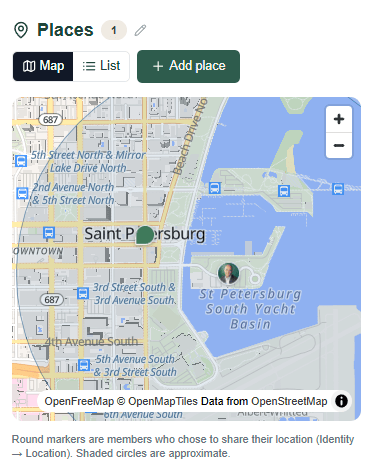
A safer map. The Places map now runs on the latest version of its mapping software, closing another issue rated critical. Your pod's map looks and works the same. Between these two updates, our production security audit went from four critical alerts to zero.
Less code we don't use. We removed a library for a third-party voting service that SpiritDAO never used. Our proposals and votes have always run on our own system. We also cleared out old libraries and leftover folders from the toolkit the app was originally built from. Less to maintain, less that can go wrong.
Notifications have a speed limit. Notifications can reach your phone as push alerts, so they should never become a way to flood someone. Any one member can now send at most 20 per hour to the same person, and 1,000 per hour in total. That ceiling is roughly ten times the biggest real announcement we've seen, so a leader announcing a proposal to a whole pod won't come close. Reminders and other notices the app sends itself aren't affected.
If your pod uses the Places map, open it when you get a chance and tell us whether the map and your pins appear. And if you're registering for an upcoming event, your new check-in code is waiting on the event page. Both work in our testing, but the first real use is where we'll know for certain.
If something stops working or looks wrong, tell us in the forum. That is still how most of this gets found.
We strongly recommend registering for events within the SpiritDAO app (Events section) at app.spiritdao.org, it's how we gauge attendance and shape the flow of each session. Links to each event may be found in-app under the Events section.
Town Hall — Mon, Oct. 5th · 8:00 PM EST - A standing community gathering for conversation, questions, and shared presence.
First Contact — Wed, Oct. 7th · 8:00 PM EST - The official starting point for new members — a peer-to-peer orientation into how participation works.
Feedback Loops — Fri, Oct. 9th · 8:00 PM EST - A live working session where the community helps shape the app. Bring your bugs, your questions, and your ideas.
SpiritDAO is 100% donor-funded. There are no subscriptions, no paywalls, no venture capital. Every community on this platform uses it for free and that's by design. Our runway is small, and every donation directly extends how long we can keep building. If this work matters to you, even a small contribution goes further than you'd think.
→ Donate at spiritdao.org/donate
SpiritDAO is a registered 501(c)(3). Your donation is tax-deductible. (EIN: 99-1308806)
The best way to get in touch is within our community: https://app.spiritdao.org
Or write to Ron Rivers: ron@spiritdao.org
Thank you for reading!
Please share this email with any friends you think might enjoy this newsletter. We are spreading the message one curious person at a time.
Connect with SpiritDAO
🧠 SpiritDAO App
🌐 SpiritDAO.org
▶️ YouTube
🐦 Twitter / X
TikTok
📜 Docs
SpiritDAO is a registered 501(c)(3) EIN #99-1308806.


