

Every time you open a new AI chat and restate your project, you pay a tax. It is not on your card statement, so it is easy to ignore. This post puts numbers on it, compares four ways to stop paying it, and shows the one test I would run before trusting any of them. The focus is persistent memory for AI agents, including Lighthouse Memory, a network-backed option built around three calls: remember, recall and forget.
Step 1: Price the tax
Use a model you can edit. These are assumptions, not measurements.
-
Project brief: 1,500 words, about 2,000 tokens
-
Sessions per week: 10
-
Time restating each session: 3 minutes
Time: 10 x 3 = 30 minutes a week. Over 52 weeks that is 1,560 minutes, or 26 hours.
Tokens: 10 x 2,000 = 20,000 a week, or 1,040,000 a year.
Change the three inputs and the totals move in a straight line. If you run 25 sessions a week, you are at 65 hours and 2.6 million tokens a year. The tax scales with how much you use AI, which is exactly when it hurts most.
Step 2: Compare the four ways out
The ratings below are my own assessment, based on how each approach is built, not a benchmark.
| Approach | Setup effort | Works across agents | Verifiable | Privacy default | Best for |
|---|---|---|---|---|---|
| Re-paste | None | Yes, by hand | No | You control it | One-off tasks |
| Vendor memory | Low | Usually no, stays in one product | No | Vendor-managed | One assistant, low sensitivity |
| Self-hosted files or vector store | High | Only if you build it | Only if you build it | Stays on your machine | Sensitive data |
| Network-backed (Lighthouse Memory) | Medium | Yes, via SDK or MCP connection | Yes, by CID (integrity only) | Batched blobs are unencrypted; Memwal is encrypted | Several agents or machines |
Step 3: Three numbers worth remembering
75% fewer tokens per session. If recall returns 5 records of about 100 tokens (500 tokens) instead of resending the 2,000-token brief, you save 1,500 tokens a session. Over 520 sessions that is 780,000 tokens a year. The inputs are assumptions, so recompute with yours.
90% less storage quota when batching. Per Lighthouse's documentation, a Walrus blob counts about 63 MB against quota regardless of size. One hundred memories saved individually is about 6,300 MB. The same hundred, flushed 10 at a time (the default), is about 630 MB.
9 supported configurations. The batched engine pairs 4 storage options with 2 embedders, which is 8 setups. Add the Memwal engine and you have 9. That sounds like a lot of choice, and it is a useful map of what you need to decide.
Step 4: Know where it breaks
I would not recommend any memory layer without its failure list. These come from Lighthouse's own documentation.
-
Batched memories are unencrypted. Anyone with the CID can read them. Do not store secrets.
-
Forget is not instant erasure. On Lighthouse storage it stops renewal, and the content stays readable until it expires. With Memwal there is no relayer delete API, so the encrypted blob lapses on its own.
-
A CID proves integrity, not truth. If you saved the wrong fact, it will verify perfectly.
-
Sharing is not automatic. Each application needs its own connection, through the SDK or a supported MCP client. The agent logos on the demo are an idea, not a list of one-click integrations.
Step 5: Run the 10 minute test
Before you decide, do this.
-
Install the packages from the Lighthouse Memory quick start and set your API key.
-
Save three memories: one preference, one decision, one project fact. Use tags.
-
Call
status()and note how many are pending, then callflush(). -
Recall with a question phrased differently from what you saved.
-
Record what came back first, and how long the whole thing took.
The recall ranking is 0.7 x cosine similarity plus 0.3 x keyword match, so a record with an exact tag can outrank a more semantically similar one. Test that on purpose.
How do you write memories worth recalling?
Because recall blends 70% semantic similarity with 30% keyword match, how you save a record decides whether you find it. Three habits follow from that.
Write one fact per memory. "We use TypeScript" is retrievable. A paragraph mixing stack, deadline and tone is not. Short records also keep recall cheap: 5 records of 100 tokens is 500 tokens, while 5 records of 400 tokens is 2,000, which erases the saving.
Tag with the words you will search with. The keyword half of the score rewards exact terms, so a tag like project or preference can lift a record above a semantically closer one. Use a small, consistent set.
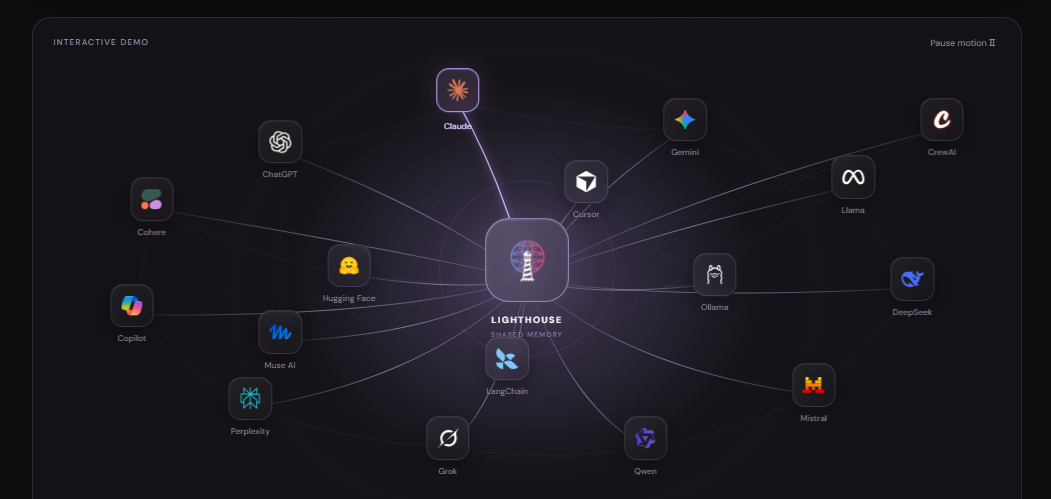
Save decisions, not chatter. Preferences, decisions and project state are what the Lighthouse demo itself saves. Everything else belongs in the chat, where it can safely disappear.
What does one week look like with and without memory?
Run the earlier assumptions through a single week of 10 sessions.
|
| Without memory | With recall (assumed) |
|---|---|---|
| Time restating context | 30 minutes | Near zero after setup |
| Tokens of context sent | 20,000 | 5,000 |
| Context freshness | As current as your last paste | As current as your last saved record |
The 5,000 comes from 10 sessions x 500 tokens. Setup is not free, so give it a break-even: if setup and tagging take 2 hours (120 minutes) and you save 30 minutes a week, you break even in 4 weeks. Stretch setup to 5 hours and break-even is 10 weeks. Those inputs are yours to replace.
Where would this actually be used?
Lighthouse's own site lists four use cases: trading agents (keeping strategy and execution in context), prediction markets (carrying research into the next decision), tokenised assets (connecting assets with their history) and physical AI (memory beyond a single machine). The common thread is a long-running agent that makes repeated decisions and gets worse every time it loses context. If your agent runs once, you do not need any of this.
So which one?
-
Paste if the job is short.
-
Vendor memory if you live in one assistant.
-
Self-host if the data cannot leave your machine. Lighthouse's own SDK can run fully offline with a local folder.
-
Network-backed memory if you work across agents or machines and want to verify what was stored.
Lighthouse also has an upcoming TGE. No date is stated in the materials I used, so I will not guess one.
The one line to keep
Memory is a decision about what is worth remembering, where it lives and who can read it. The tool comes second.
To try the shared-memory demo, start at memory.lighthouse.storage. Mechanics referenced here come from the Lighthouse Memory docs.