 Zeeve
ZeeveMapping Rollup Interoperability for Cross-chain Connectivity
Let’s dive into the most-talked topic in L2 space; rollup interoperability solutions. You may already know that the problem of ‘fragmented interoperability’ has always been a roadblock to seamless Web3 experience and the creation of innovative (or futuristic). Knowing this, Ethereum’s co-founder Vitalik Buterin, in his recent tweet rolled out his vision to enable cross-chain interoperability across Ethereum Layer2s. He basically talked about the following Ethereum Proposal Plans (EIPs) in the...
ZeeveWhat are Layer-2 rollup networks? Everything You Need To Know
Scalability has always been a concern for blockchains, even major network like Ethereum that want to scale and compete with TradFi. What the best blo...
ZeeveExploring the Benefits of Account Abstraction in Rollups
EIP-4337 has brought along a matured or, we can say, the final version of Account abstraction (AA), which has transformed how blockchain wallets have...
Zeeve is an enterprise-grade low-code Blockchain Infrastructure-as-a-Service platform, compliant with ISO, SOC2 Type II, and GDPR. As the leading provider of Rollups-as-a-Service, dedicated node infrastructure, and hosted subgraphs, Zeeve ensures 24x7 monitoring, Enterprise SLA, 99.9% uptime, and management dashboards for a secure and scalable web3 infrastructure.
ZeeveMapping Rollup Interoperability for Cross-chain Connectivity
Let’s dive into the most-talked topic in L2 space; rollup interoperability solutions. You may already know that the problem of ‘fragmented interoperability’ has always been a roadblock to seamless Web3 experience and the creation of innovative (or futuristic). Knowing this, Ethereum’s co-founder Vitalik Buterin, in his recent tweet rolled out his vision to enable cross-chain interoperability across Ethereum Layer2s. He basically talked about the following Ethereum Proposal Plans (EIPs) in the...
ZeeveWhat are Layer-2 rollup networks? Everything You Need To Know
Scalability has always been a concern for blockchains, even major network like Ethereum that want to scale and compete with TradFi. What the best blo...
ZeeveExploring the Benefits of Account Abstraction in Rollups
EIP-4337 has brought along a matured or, we can say, the final version of Account abstraction (AA), which has transformed how blockchain wallets have...
Zeeve is an enterprise-grade low-code Blockchain Infrastructure-as-a-Service platform, compliant with ISO, SOC2 Type II, and GDPR. As the leading provider of Rollups-as-a-Service, dedicated node infrastructure, and hosted subgraphs, Zeeve ensures 24x7 monitoring, Enterprise SLA, 99.9% uptime, and management dashboards for a secure and scalable web3 infrastructure.

Subscribe to Zeeve
Subscribe to Zeeve
Share Dialog
Share Dialog
<100 subscribers
<100 subscribers

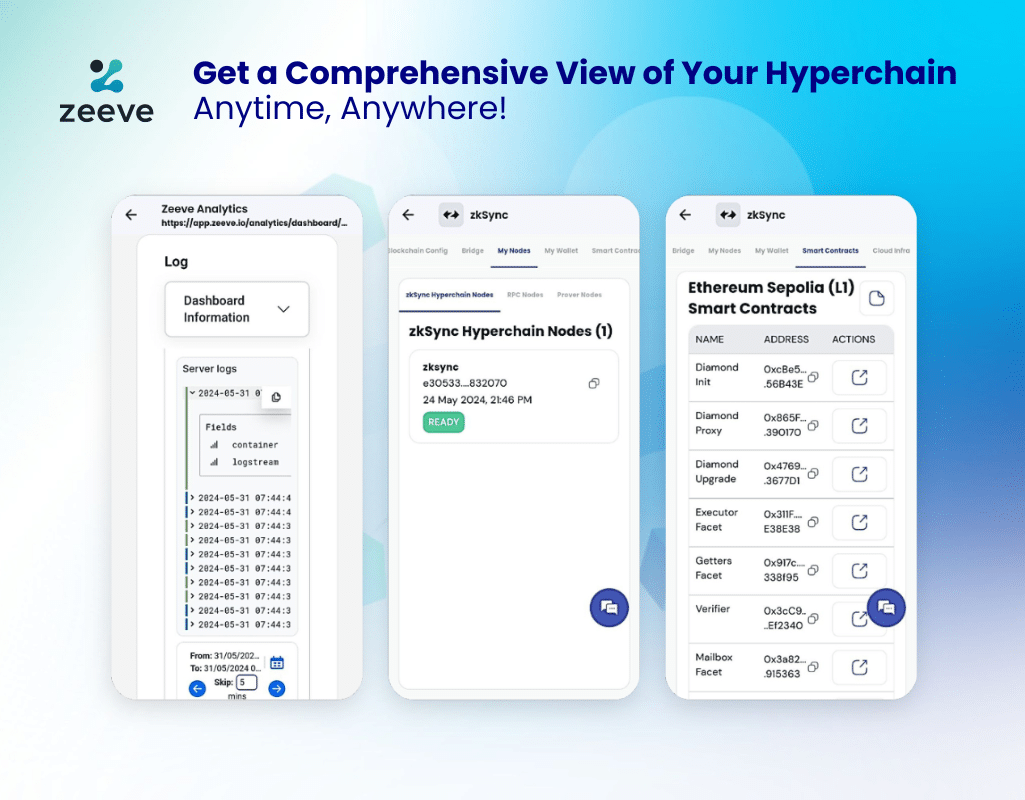
We are happy to announce that we have extended the support of the Zeeve mobile app, and now clients running their zkSync Hyperchain DevNets on Zeeve RaaS can also view and monitor their networks directly from their Android or iOS app. This enhanced mobile version, while read-only, provides a comprehensive view of analytics, chain configurations, node details, deployed smart contracts, cloud infrastructure, and more. For creating and managing new services, users will continue to use our web-based platforms.
“Launching a DevNet and having immediate access to crucial metrics without being tethered to a desktop significantly enhances flexibility for business owners, system administrators, and other key stakeholders. This integration does more than just display data; it powers our clients to oversee their zkSync Hyperchain environments with unmatched ease and agility anytime and anywhere. We are confident this will foster more efficient and scalable blockchain development, enhancing mobile monitoring capabilities that keep you informed and decision-ready, no matter where you are.”
Dr. Ravi Chamria
Co- founder and CEO of Zeeve
zkSync Hyperchain Overview Page: Click on the Explorers button to open L2 Explorer, along with basic zkSync Hyperchain Info, Block height, Health Status (Healthy or Unhealthy), L1 Info, Node Count, Cloud Infra details, alerts and access to docs.
Blockchain Configurations: To view blockchain configuration, click the Blockchain Config tab on the overview page. On the blockchain configuration page, you can view the blockchain configurations. Users can also have information related to the General Config, Block Config, Transaction Config, and zkSync Hyperchain Env.
Bridge: To view the bridge, click on the Bridge tab on the overview page. Open the bridge by clicking on the icon next to the bridge URL. This will open the zkSync Hyperchain Bridge page, where you can perform bridge operations.
My Nodes: To view nodes, click on the My Nodes Tab. Users can see the machine status of the nodes (zkSync Hyperchain Nodes, RPC Nodes and Prover Nodes (not available in devnet).
My Wallets: To view wallet information, click on the My Wallets tab on the overview page. You can view the wallets on Explorers by clicking on the links provided against each wallet.
Smart Contracts: To view smart contracts for both L1 and L2, click on the Smart Contracts tab on the overview page. Click on the icon under the Actions column to view smart contracts on the Explorer.
Cloud Infra: Details of Clod, Region, Machine Status, Machine Configurations and Storage.
Download the Zeeve app from the Apple App Store or Google Play Store. Log in to your Zeeve account with Google, Apple, GitHub, and your Registered email ID, or sign up in just a few taps. Go to the zkSync Hyperchain section, and your deployed DevNet should be visible there (along with a public Demo network). That’s it!
Thank you for choosing Zeeve as your trusted partner in blockchain infrastructure. We can’t wait to see what you’ll build next!
We are happy to announce that we have extended the support of the Zeeve mobile app, and now clients running their zkSync Hyperchain DevNets on Zeeve RaaS can also view and monitor their networks directly from their Android or iOS app. This enhanced mobile version, while read-only, provides a comprehensive view of analytics, chain configurations, node details, deployed smart contracts, cloud infrastructure, and more. For creating and managing new services, users will continue to use our web-based platforms.
“Launching a DevNet and having immediate access to crucial metrics without being tethered to a desktop significantly enhances flexibility for business owners, system administrators, and other key stakeholders. This integration does more than just display data; it powers our clients to oversee their zkSync Hyperchain environments with unmatched ease and agility anytime and anywhere. We are confident this will foster more efficient and scalable blockchain development, enhancing mobile monitoring capabilities that keep you informed and decision-ready, no matter where you are.”
Dr. Ravi Chamria
Co- founder and CEO of Zeeve
zkSync Hyperchain Overview Page: Click on the Explorers button to open L2 Explorer, along with basic zkSync Hyperchain Info, Block height, Health Status (Healthy or Unhealthy), L1 Info, Node Count, Cloud Infra details, alerts and access to docs.
Blockchain Configurations: To view blockchain configuration, click the Blockchain Config tab on the overview page. On the blockchain configuration page, you can view the blockchain configurations. Users can also have information related to the General Config, Block Config, Transaction Config, and zkSync Hyperchain Env.
Bridge: To view the bridge, click on the Bridge tab on the overview page. Open the bridge by clicking on the icon next to the bridge URL. This will open the zkSync Hyperchain Bridge page, where you can perform bridge operations.
My Nodes: To view nodes, click on the My Nodes Tab. Users can see the machine status of the nodes (zkSync Hyperchain Nodes, RPC Nodes and Prover Nodes (not available in devnet).
My Wallets: To view wallet information, click on the My Wallets tab on the overview page. You can view the wallets on Explorers by clicking on the links provided against each wallet.
Smart Contracts: To view smart contracts for both L1 and L2, click on the Smart Contracts tab on the overview page. Click on the icon under the Actions column to view smart contracts on the Explorer.
Cloud Infra: Details of Clod, Region, Machine Status, Machine Configurations and Storage.
Download the Zeeve app from the Apple App Store or Google Play Store. Log in to your Zeeve account with Google, Apple, GitHub, and your Registered email ID, or sign up in just a few taps. Go to the zkSync Hyperchain section, and your deployed DevNet should be visible there (along with a public Demo network). That’s it!
Thank you for choosing Zeeve as your trusted partner in blockchain infrastructure. We can’t wait to see what you’ll build next!
Zeeve
Zeeve



No activity yet